

Telephony Update – June

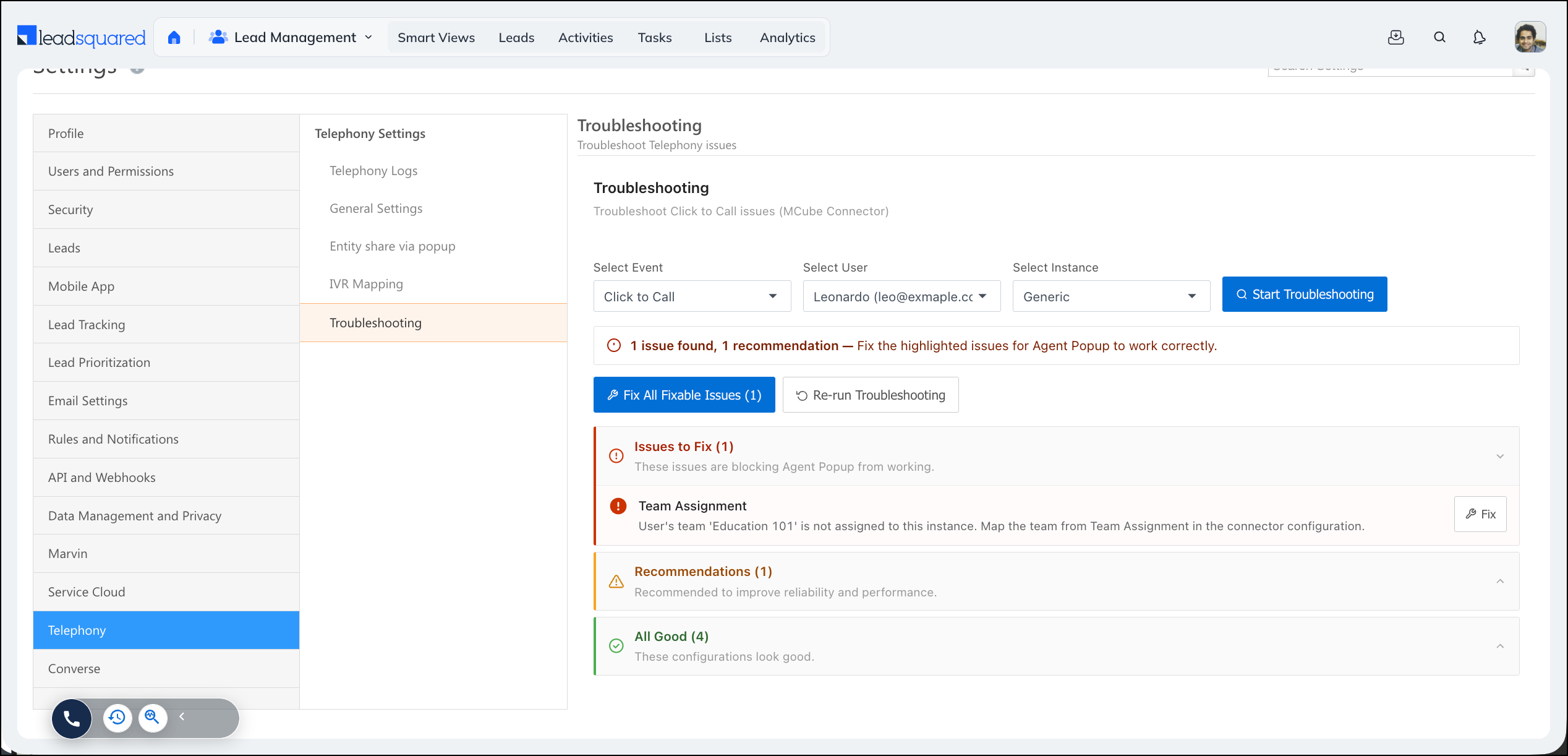
Troubleshoot Telephony Issues from the UI
Earlier, diagnosing a telephony problem such as a missing agent popup or a failed click to call usually meant raising a support ticket and waiting for a response. You can now check the configuration yourself and resolve most issues from a single panel.
What’s new?
A new Troubleshooting section is available under Setting>Telephony, and from the telephony icon at the bottom of your screen. Select an event (agent popup, click to call, agent panel, or call log), the user facing the issue, and the connector instance, then run the check to see what is blocking the event, what to improve, and what is already working. Issues that can be corrected automatically come with a one-click fix, and you can re-run the check to confirm the result.
For more information, read this article: Telephony Troubleshooting.
Bulk Upload Virtual Numbers on UTC
Earlier, in the Universal Telephony Connector, virtual numbers had to be added one at a time, which was slow when setting up or updating a large telephony account. You can now add it in bulk.
What’s new?
You can now bulk upload virtual numbers using a CSV file. We recommend downloading the sample CSV, entering your values in it, and then uploading the file so the format matches what the system expects. Each upload supports up to 1000 records.
