

Platform Updates – SalesCloud.2026.2

NextGen
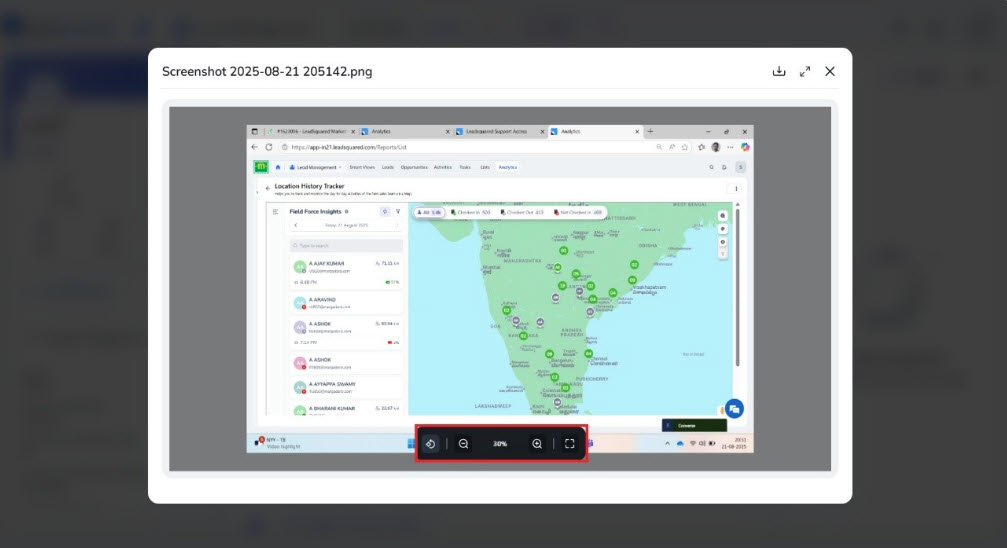
Image Rotation and Zoom Support in Previewer
Users can review documents and images more easily with improved visibility and control during preview.
What’s New?
The image previewer in the NextGen Web App now supports image rotation and zoom. Users can rotate images using the toolbar (90° clockwise per click) and zoom in or out while previewing.
Lead Details Page – Campaign Emails Tab
The refreshed design improves readability and makes it easier to review campaign email interactions while keeping the existing workflow unchanged.
What’s New?
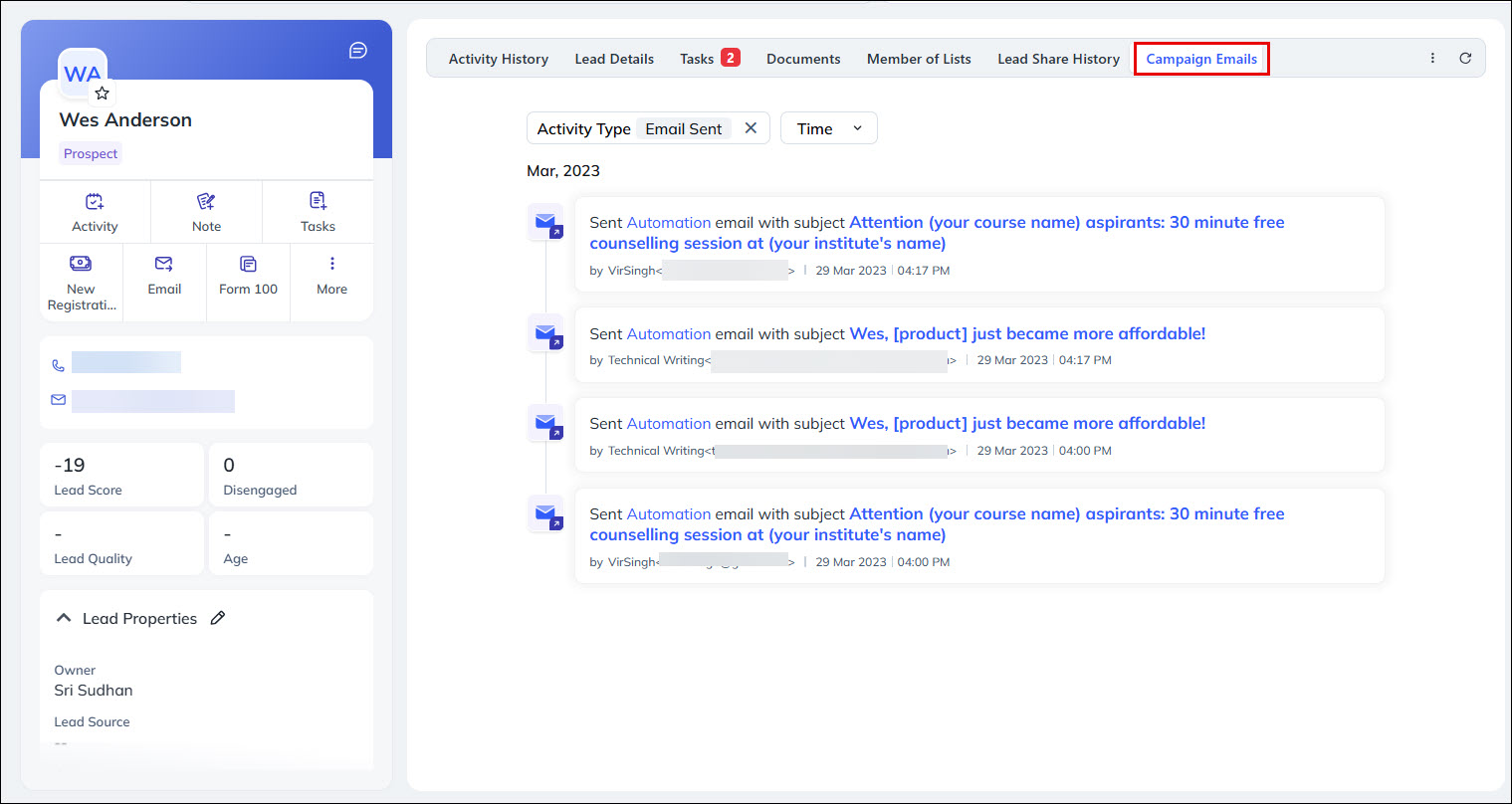
The Campaign Emails tab on the Lead Details page has been refreshed with an improved design while retaining the same functionality.
- The tab works the same as before with a new look and feel.
- Emails can be filtered by Time.
Lead Details Page – Members of Lists Tab
Users can quickly view all static list associations for a lead in one place, making it easier to understand lead segmentation and list membership.
What’s New
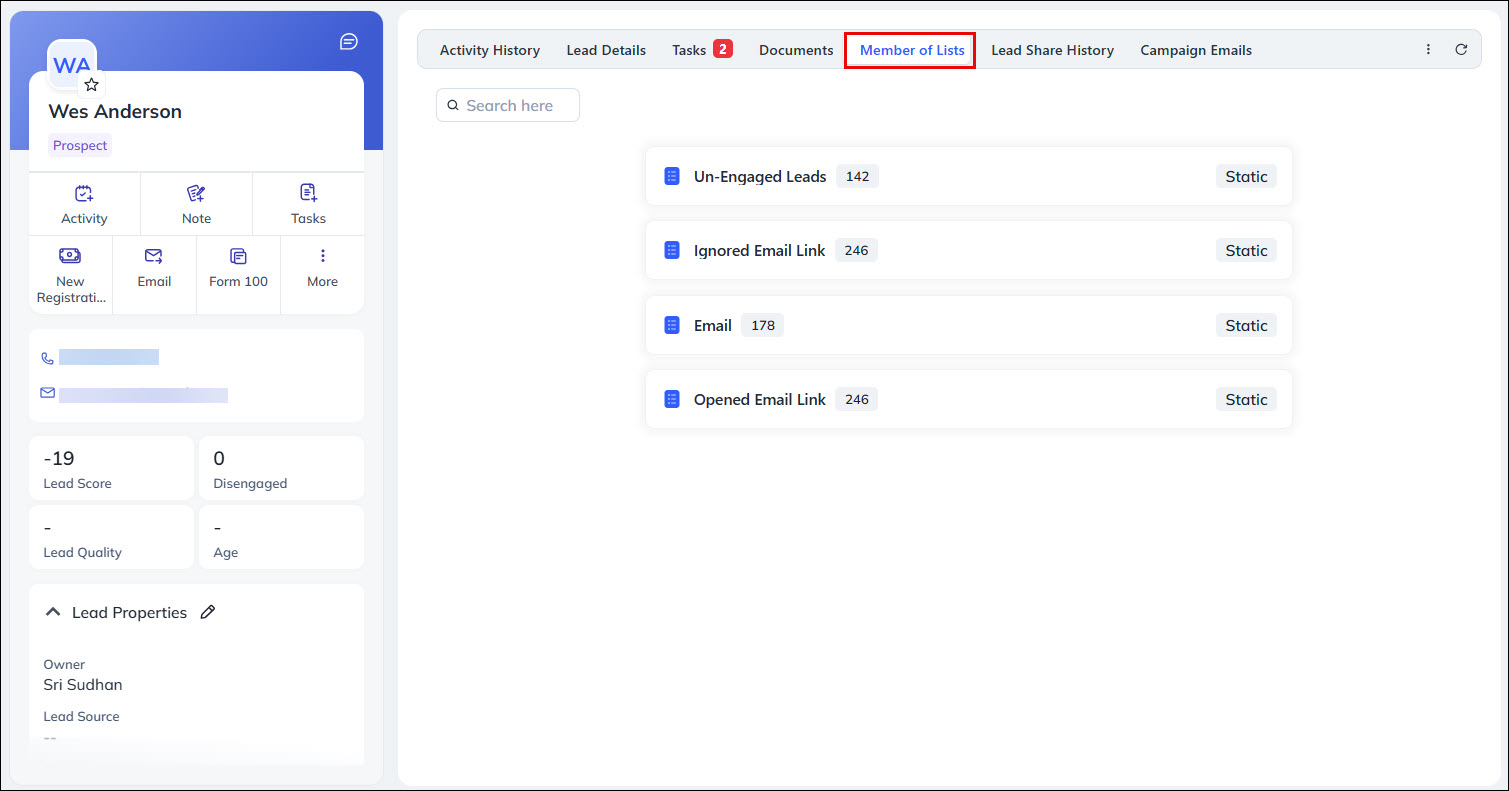
The Members of Lists tab displays all static lists that a lead is part of.
- Shows only static lists associated with the lead (dynamic lists are not included).
- Includes a Search option like the Manage Lists page.
- Each list card displays the List Name, Lead Count, and List Type icon.
Lead Documents in Send Email
Users can quickly attach existing lead documents to emails, making it easier to share relevant information without searching for files separately.
What’s New?
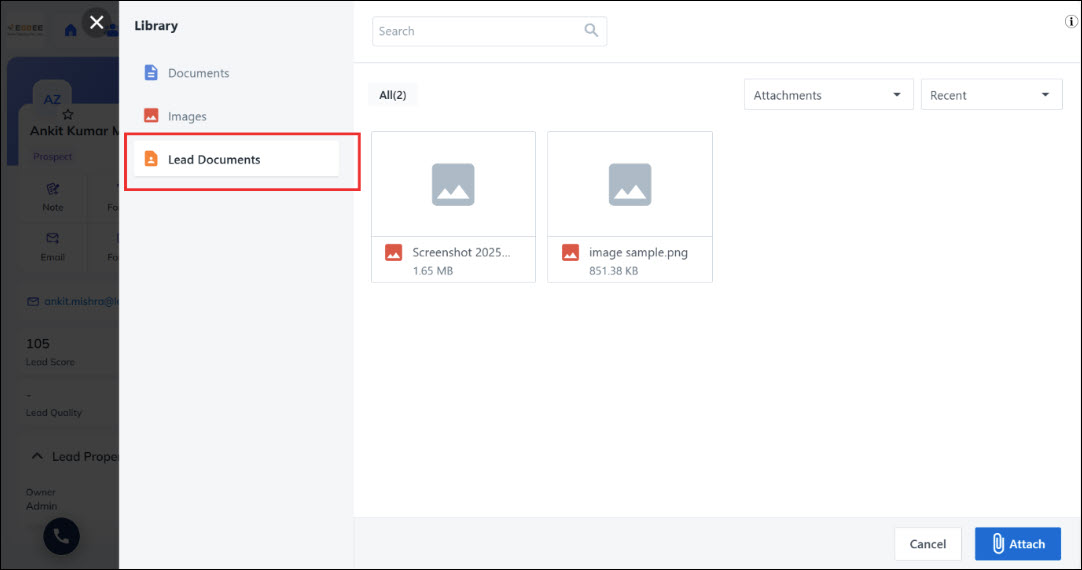
You can now attach files from the Lead Document Library while sending one-to-one emails.
- Available only for single-recipient emails (Lead and Opportunity).
- The Lead Documents option appears below Images in the attachment section.
Manage Opportunity Page – Change Owner & Change Stage
You can update Opportunity owners and stages more quickly, directly from the Manage Opportunities page.
What’s New?
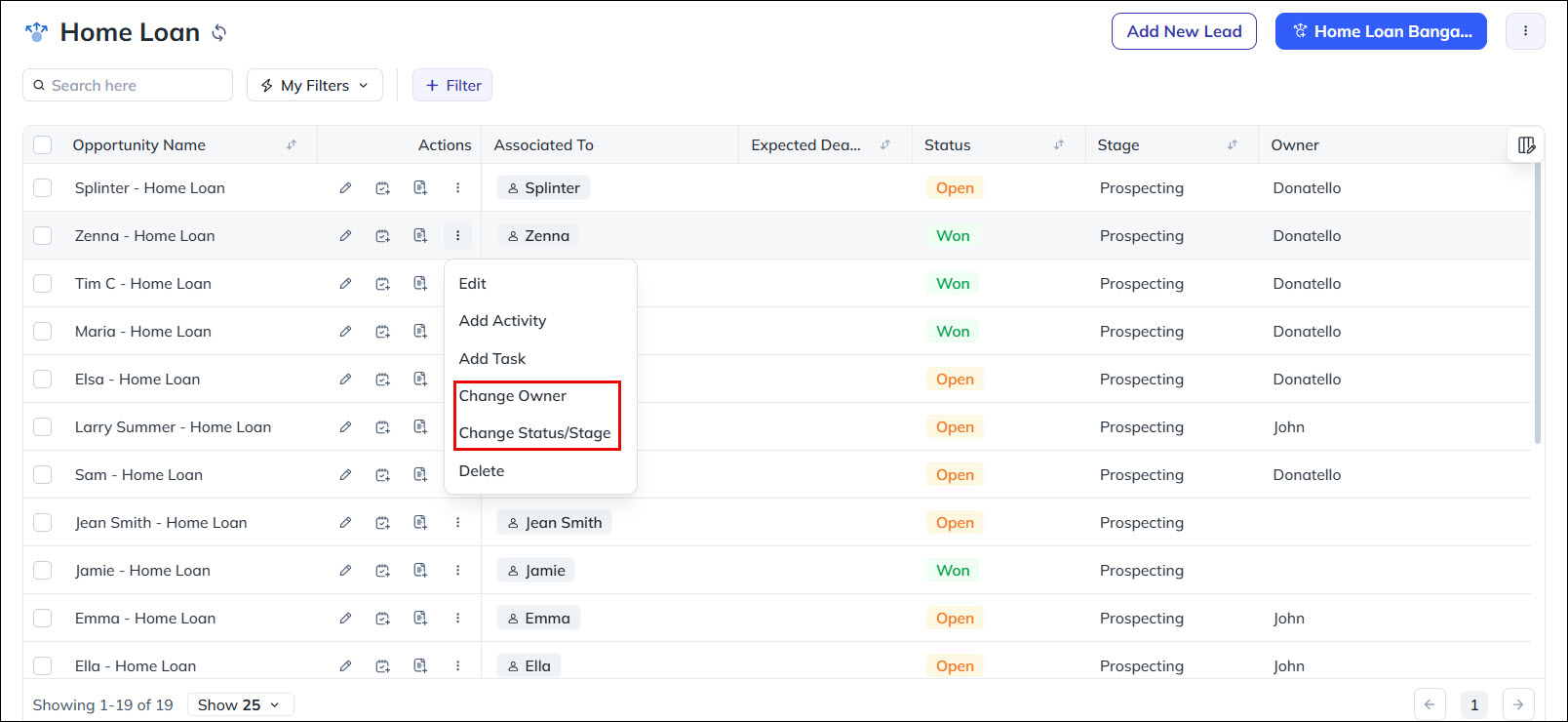
You can now update Owner and Stage directly from the Manage Opportunity page from More Actions and through Bulk Actions.
Clone List and Tag List
Users can quickly reuse existing lists by cloning them and organize lists more efficiently with tags. Enhanced tagging and filtering make it easier to manage large numbers of lists and find the right ones faster.
What’s New?
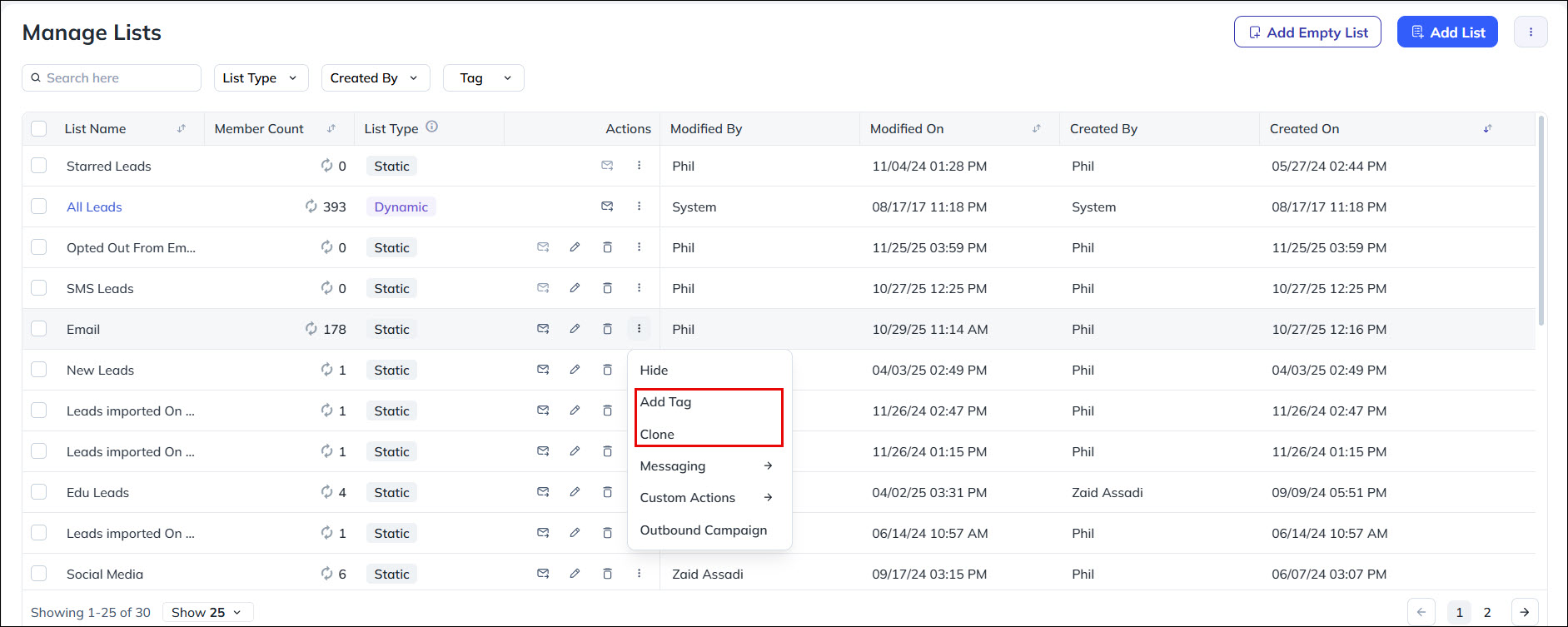
You can now create a copy of an existing list from More Actions → Clone. Cloned lists are named “<Original List Name>_Clone”. Cloning is available for all lists except Starred Leads and All Leads.
Additionally, you can add and manage tags for the lists. Tags can be added from the Manage Lists page and List Details page. Tags created in NextGen are also reflected in Marketing Tag Manager.
Forms Enhancement – Attachment Tab Support
This brings consistent attachment support across Sales and Custom Activities and ensures feature parity between Platform Forms and NextGen/Marvin.
What’s New?
The Attachment tab is now supported in the Sales Activity default form in NextGen/Marvin. Attachments are enabled by default for Sales Activities. For Custom Activities, attachments will be available during activity creation when the Allow Attachment setting is enabled in the activity’s settings.

Forms Enhancement – Custom Object Type
This update ensures consistent object naming across the platform and aligns form rendering with the configured Object Type display names.
What’s New?
For tenants with Object Types enabled, NextGen now consistently reflects the configured Custom Object Type Display Name. Field labels that previously contained “Lead” or “Object” will dynamically render using the active Object Type name across both Default and Dynamic forms.
Restrict Actions on Closed Opportunities
Prevent unintended changes to closed opportunities, ensuring better data control and consistency while reducing the risk of errors.
What’s New?
When enabled for an opportunity type, Non-admin users cannot perform actions on Won or Lost opportunities. The restricted actions appear disabled. Hovering over a disabled action shows the message: “Action not allowed on Closed/Won records.”
Bug Fixes
Core Platform
- Fixed an issue where encrypted data in Process DB was not correctly stored for webhook executions.
- Resolved a problem where the Create Activity webhook trigger was not firing as expected.
- Addressed an issue where the Opportunity Create webhook was not triggering.
- Ensured encrypted data is now stored correctly in HTTP WFA entries within the Process DB.
- Fixed an issue where the Automation Report was not returning any data from the API v1/ProspectActivity.svc/RetrieveActivities.
- Resolved a failure in Notifier.svc – Push Notification v2 API.
- Fixed an issue where the Import Activity button was not visible for users with an applied Permission Template, even when the Activity Entity Feature was enabled.
- Corrected webhook behavior where incorrect data was sent when updating “Block Schedule” with multiple comma-separated values.
- Fixed an issue in Platform LOS options: While LOS options were stored in DB during manual import, they were not updated during auto-update, impacting downstream dependency (SIERA).
- Resolved a UI issue where the Permission Template page displayed two “Activities” sections when Activity Field Level Masking was enabled in OT-enabled tenants.
- Fixed an issue where Automation notification for Capture Opportunity activity was not working.
- Addressed a problem where the Converse Auth API was getting blocked due to Coralogix RUM changes.
Marketing
- Fixed an issue where the Reply-To address was not working for one-to-one emails, Email Campaigns, and Bulk Emails.
- Resolved a problem with Mail Merge field validation. The issue occurred due to an invalid mail merge token @{Lead:FirstName}.
- The correct format is @{Lead:FirstName,}
- The missing comma resulted in validation failure, which has now been fixed.
NextGen
- Fixed an issue with Email Document Templates Attachment.
- Fixed an issue where the Account column was not getting exported in the CSV file when exporting activities from the Manage Activities page.
- Fixed an issue with Opportunity Owner Sales Group Field.
- Fixed an issue with advance search filter.
- Fixed an UI Confusion for Object Types in opportunity details vCard.
- Fixed an issue where Account Type dropdown was displaying account related fields.
- Fixed an issue where all dropdown values in Bulk Update Lead Field were invisible.
- Fixed an issue where a Smart View tab was not editable.
Automation
- The SendEmail automation card now respects the account-level date format when rendering date fields. Opportunity Date, Opportunity CFS Date, and Activity CFS Date fields will appear in the configured format within email templates.
- Date-Time fields in automation emails previously included seconds (e.g., 02/02/2026 02:22:00 PM) even though the CRM stores only hours and minutes. Seconds will now appear only when they are non-zero.
- Opportunity CFS Date fields were incorrectly showing a time component and now display only the date based on account settings. CFS String fields containing time values like “10 AM” or “4 PM” are no longer converted to DateTime and will appear as entered.
- Some automation triggers were silently dropped due to a stale MySQL session variable. Session variables are now reset properly to ensure all triggers execute reliably.
- Automation Failure Reports for Opportunity-based triggers were not showing the Opportunity name. The report now correctly displays the Opportunity name for all relevant triggers.
- The Automation Cron Service now supports configurable batching and improved scheduling logic to handle large volumes efficiently. New metrics track processed entities and execution time per cycle.
- Automation now sends only relevant entity data to the Distribution Engine (Lead data for Lead triggers and Opportunity data for Opportunity triggers), reducing payload size and improving accuracy.
Forms – NextGen
- Fixed an issue where the form scrolled back to validation errors when users tried to scroll to the bottom after clicking Save in both dynamic and default forms.
- Fixed an issue where the file name was displayed instead of the uploaded file preview, even when the Show images in preview property was enabled for file upload and signature fields.
- Fixed an issue where data entered in the LastEMIDate hidden field was not saved.
- Fixed an issue where the value entered in a number field disappeared when users increased or decreased the value using the arrow controls for Lead, Opportunity, Activity, and Task entities.
