

Platform Updates – SalesCloud.2025.12

Call Preference Settings
What’s the Benefit?
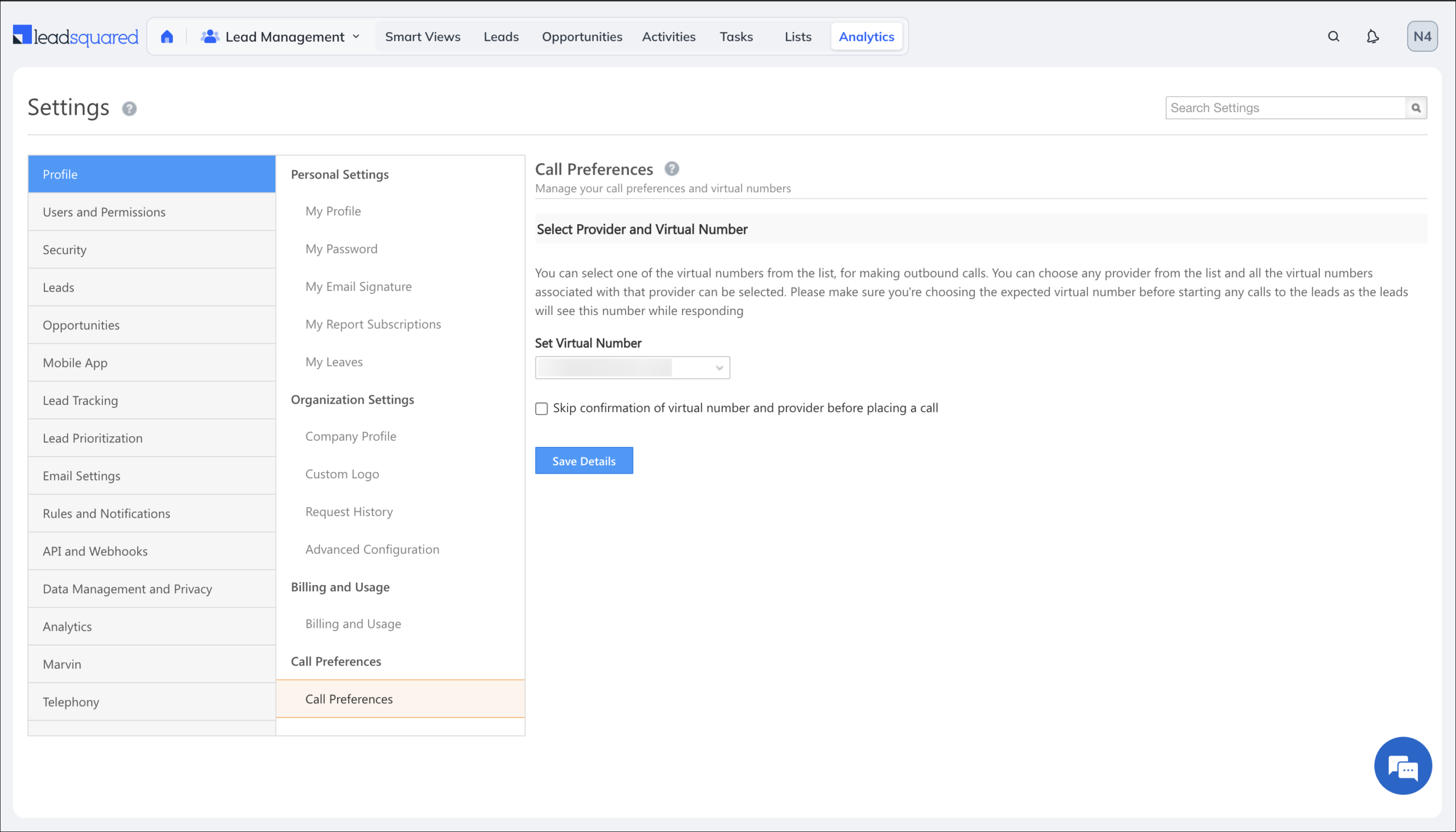
Users can manage their calling preferences directly within NextGen, ensuring smoother call handling, better control over outbound calling behavior, and a more unified calling experience.
What’s New?
Call Preference Settings are now available in NextGen, allowing users to configure:
- Associated Number Selection
- Provider & Virtual Number Selection
Audit Compliance
What’s the Benefit?
Users can easily review, reference, or audit previously uploaded CFS files, improving traceability and reducing the risk of losing important configuration history.
What’s New?
When a Custom Field Set file is replaced with a new upload, the previously uploaded file is now accessible in the Request History section under Web App Settings.
Performance
- Optimized Job Timeout and vCPU allocation for parallel processing, improving overall efficiency.
- Enhanced bulk opportunity & activity update operations, reducing processing time significantly.
Security
- Implemented measures to prevent cache domain retrieval from hitting MasterConfig during potential DDoS attacks on landing pages.
- Fixed SQL injection vulnerabilities in:
- svc/ActivityOwner.Get API
- svc/LeadOwner.Get API
Field-Level Encryption on NextGen
What’s The Benefit?
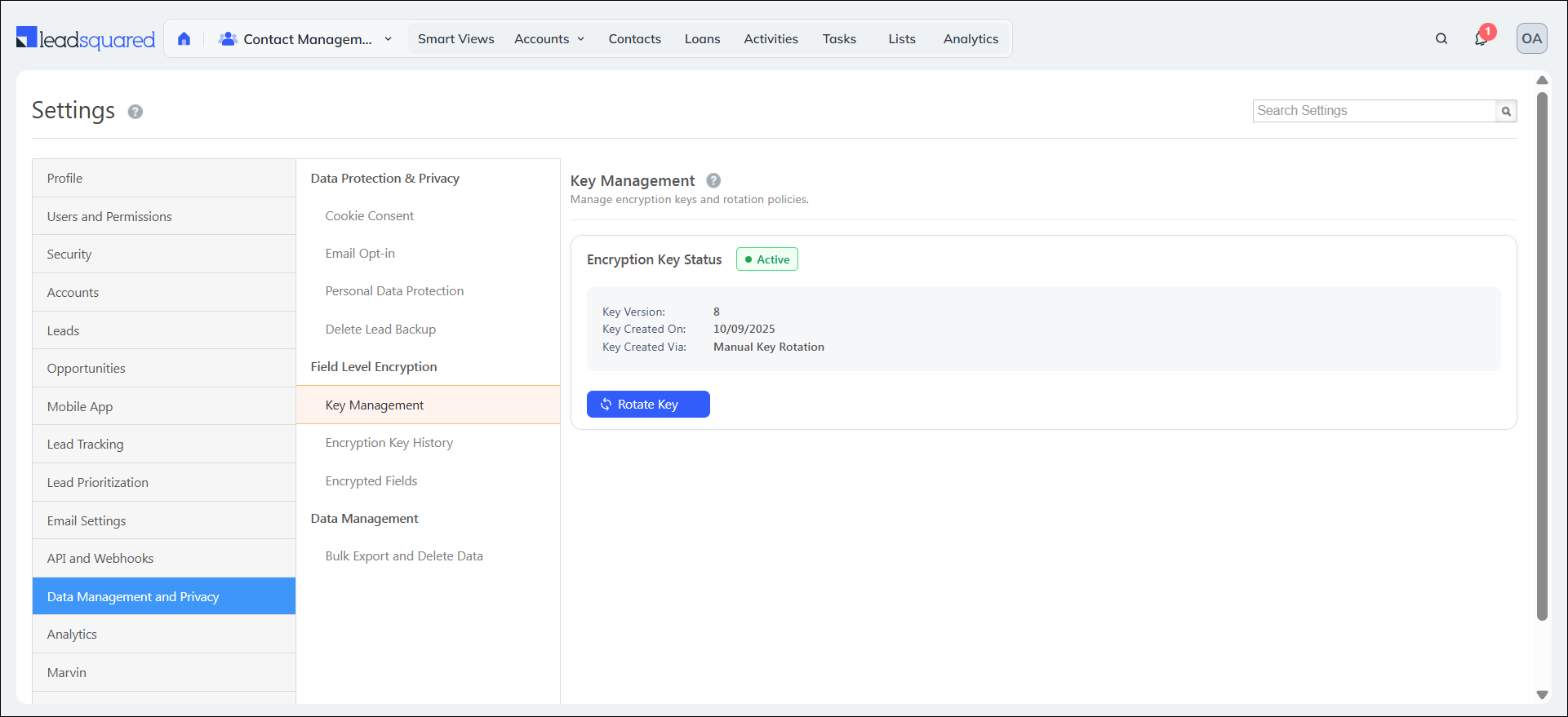
Field Level Encryption helps protect sensitive customer information, ensures compliance with security standards (e.g., GDPR, HIPAA), and prevents unauthorized access while keeping data seamlessly accessible to permitted users.
What’s New?
Previously, Field-Level Encryption was available only on LeadSquared’s legacy platform. It is now accessible to all accounts with NextGen enabled, allowing you to encrypt sensitive fields across Leads, Opportunities, and Activities.
Behavior for Encrypted Fields:
- Global & Quick Search: Supports Exact Match only (partial search not supported).
- Manage Leads Grid: Sorting and filtering are disabled for encrypted columns.
- Advanced Search is limited to the following operators:
- Equals / Does Not Equal
- Contains Data / Does Not Contain Data
Quick View Enhancement
What’s The Benefit?
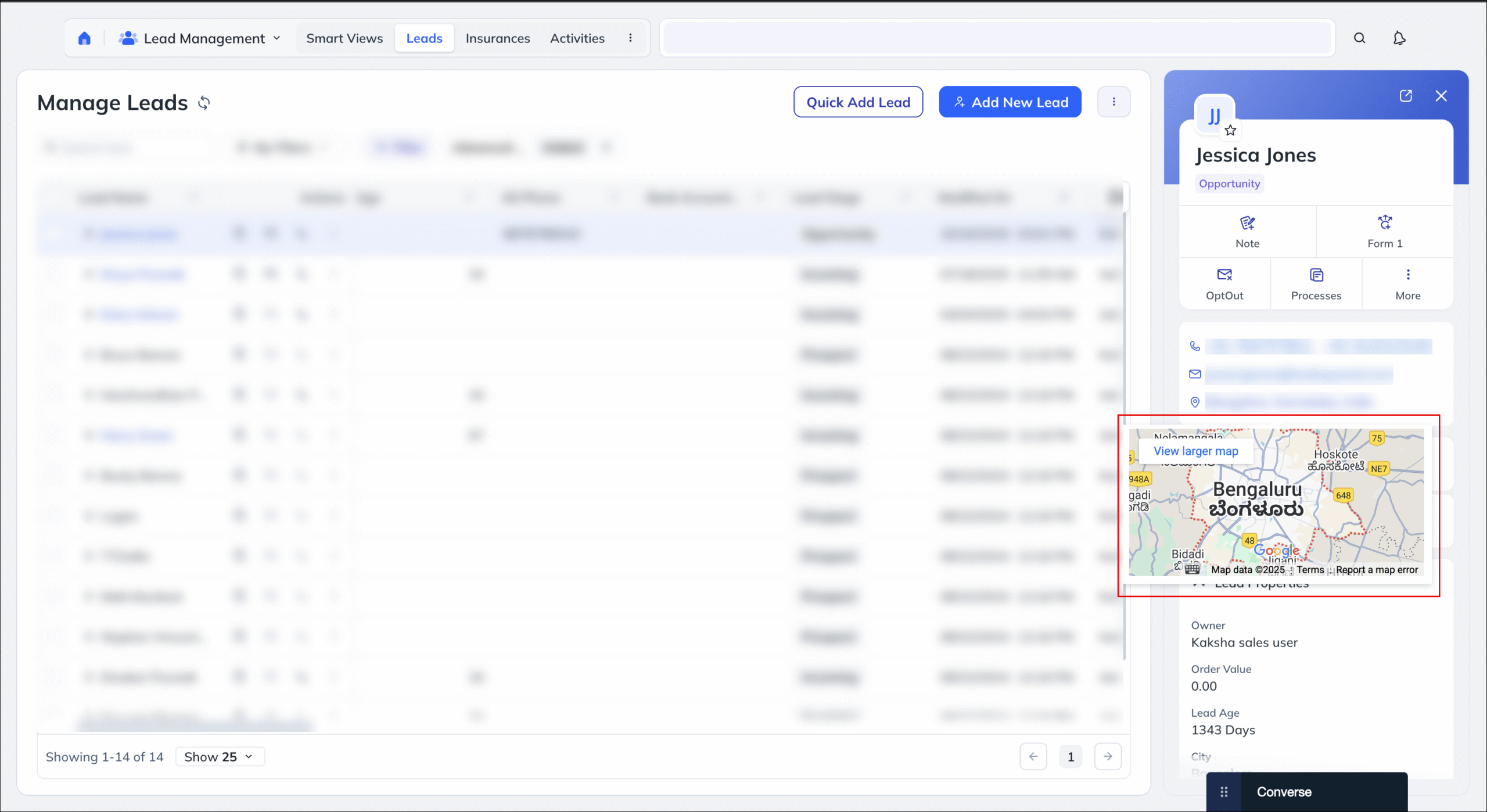
Users can quickly view and open map locations directly from Quick View, improving navigation efficiency and creating a consistent experience across the platform.
What’s New?
The Address field in Quick View now includes a Maps tooltip and is clickable, allowing users to instantly open and view the location on a map.
Dynamic Forms Regex Enhancement
What’s the Benefit?
It improves data quality, prevents invalid values from bypassing validation, and aligns behavior with admin expectations for mandatory regex checks.
What’s New?
Regex validations will now execute even for Read-Only fields. If the value does not satisfy the configured regex rule, the form will display the validation error accordingly, regardless of the field’s read-only status.
Bug Fixes
Core Platform
- Fixed an issue where the task filter was missing in Opportunity Advanced Search.
- Fixed encrypted phone field hashing issue during Opportunity import (previously included country code, causing duplicate leads during telephony calls).
- Fixed an issue where child lead activities were not reflected on the parent lead after merging.
- Fixed opportunity imports failures when lead identifier field was encrypted using Field Level Encryption feature.
- Fixed an issue where Default Country was not populated on Export HTML Landing Page.
- Fixed an opportunity import failure without proper error message when new dropdown values were specified during import.
NextGen
- Fixed an issue with Advanced Filters, where the custom date does not follow the date setting in user profile.
- Fixed an issue where “Lead created on” filter was not working as expected on the manage activities page.
- Fixed an issue where email campaigns were not listed and Advanced Filter was showing the same links for all campaigns and email link clicked filter was not working.
- Fixed an issue where Lead Import showed error when field edit was restricted.
- Fixed an issue where Import for Object Associations was working in Platform but not in NextGen.
- Fixed an issue where hyperlinks were opening in the same browser tab instead of opening in new tab.
- Fixed an issue, where in some cases, for Manage Leads, wrong payload led to wrong advanced search results when filtered for task status.
- Fixed an issue where Manage filters (configure fields option) was not getting hidden after applying restriction template in SmartView tabs.
- Fixed an issue where the Start Date and End Date were being set to the previous day while selecting a custom date range for Lead Activity in the advanced search filters.
- Fixed an Advance Filter Issue for Created On Date in NextGen.
- Fixed an issue with filter showing incorrect results.
- Fixed an issue where Add to list limit not increased.
- Fixed an issue where Add New Tab option was visible even though it was restricted through the restriction template.
- Fixed an issue in Advance Search, where duplicate date filters were visible for lead activity condition.
- Fixed an issue where incorrect count of total number of leads was displayed in list details page for dynamic lists.
- Fixed an issue where Advanced Search showed unsupported operators for encrypted fields.
- Fixed an issue where expected operators weren’t showing for DateTime field in Advanced Search.
- Fixed an issue with Error in Manage Account display in NextGen.
Marketing
- Fixed an issue where the default country code was not being populated correctly in the exported HTML landing page.
Forms & Processes
NextGen
- Resolved an issue where users were able to submit a form by entering only a space in textbox and CFS string fields, even when those fields were marked as mandatory.
- Resolved an issue where the Date field was saved with a time value and converted to UTC, causing lead details to display +1 day instead of the selected date when the current date was set via rules.
- Resolved an issue where dropdowns displayed the same data despite selecting different LAPP Set Options.
- Resolved an issue where multiple LAPP calls were triggered in network logs when the “Set Options from LAPP” rule was executed.
- Resolved an issue where the “Save and Add New” functionality was not working.
- Resolved an issue where a shimmer effect appeared after clicking “Add New” in the Activity Lead Field on Activity Forms.
- Resolved an issue where rule revert was not working for “Set Options from Mavis/LAPP.”
- Resolved an issue where the slide arrow was not visible in forms containing more than eight tabs.
- Resolved an issue where form rules were not working for the Notes (Text Area) field.
- Resolved an issue where OTP was not triggered for the email field when “Allow creation of duplicate lead” was enabled
