
Currency Format for Number Fields in NextGen
What’s the Benefit?
You can now ensure consistent and standardized currency display across NextGen. By configuring a default currency format, all currency-based number fields are rendered uniformly, improving data readability, reducing confusion, and helping teams interpret financial values faster and more accurately across the platform.
What’s New?
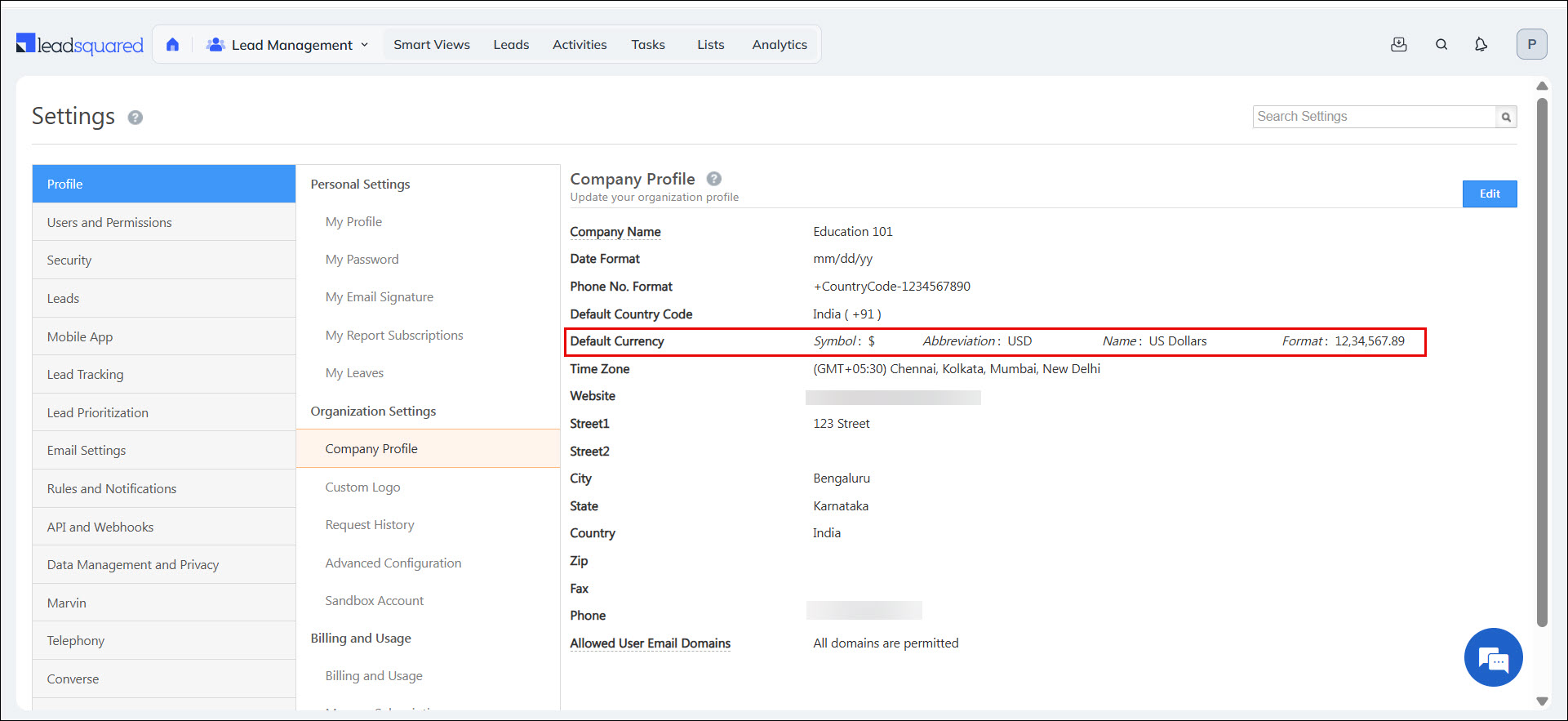
NextGen now supports configurable currency formatting for Number fields. Admins can define a default currency format in Company Profile settings. When a Number field is set to the Currency render type, values are displayed using the configured format across all supported work areas.
- Positive values (for example, 1234) appear as $ 1234.
- Negative values (for example, -1234) appear in bracket notation as $(1234).
This enhancement is available across:
- Manage Leads & Lead Details
- Manage Opportunities & Opportunity Details
- Manage Tasks
- Manage Activities
- Smart Views (all tabs)
- Manage Accounts & Account Details
- Manage Lists & List Details
Bot Filtering of Email Engagement Activities
What’s The Benefit?
By filtering out bot-generated opens and clicks, you get a clearer picture of how your emails are performing. This helps you:
- Measure real recipient engagement instead of inflated metrics.
- Make better marketing and follow-up decisions based on true user behavior.
- Avoid triggering automations or campaigns based on false signals.
In short, your email metrics now reflect human intent, not automated noise, so you can plan and optimize campaigns with confidence.
What’s New?
LeadSquared now automatically filters out email opens and clicks generated by bots and automated systems like cloud security scanners. Many email security tools scan incoming emails for threats by automatically opening messages and clicking links. Earlier, these automated actions were tracked as genuine user engagement. With this feature, such bot-driven activities are identified and excluded, ensuring that only real user interactions are recorded in your email activity data.
Core Platform – Security
- Added the Content-Security-Policy (CSP) HTTP header to web application tracker responses to enhance overall security.
- Enforced HTTPS resource loading, blocked mixed content, and enabled automatic upgrading of insecure requests.
- The ‘unsafe-inline’ directive is currently present in the CSP. It is recommended to review and replace inline scripts and styles with safer alternatives where possible to further enhance security.
- Fixed a cross-site scripting (XSS) vulnerability caused by malicious PDF file uploads.
Forms and Processes – Enhancements
- Accurate Character Count with HTML Content Support: Notes fields now calculate character count accurately even when rich text formatting and HTML tags are used. This ensures correct validation against character limits, avoids user confusion, and maintains data integrity while using formatted content.
- Rich Text Formatting Palette for Notes Fields: Notes fields now include a text formatting palette, bringing rich text editing capabilities and feature parity with Marvin. This improves content readability and presentation, enabling users to create well-structured and visually clear notes for business workflows.
Bug Fixes
Core Platform
- Fixed an issue where an empty activity history log was created even when no changes were made during activity editing.
- Fixed an issue where the Time Zone name was not displayed correctly, causing automations involving DateTime fields to not evaluate as expected.
- Fixed an issue where Sync Task export failed when the first task in the list had an associated lead without a first and last name.
- Fixed an issue in the Opportunity Details page, where providing an invalid Opportunity ID (null or a random UUID) resulted in a 404 error instead of displaying an “Invalid Opportunity ID” message.
- Fixed an issue where record sorting using CFS was not working in the Opportunity and Lead grids for OSS tenants.
- Fixed an issue in mail merge where the owner field in email campaigns failed when a space existed next to the field name.
- Fixed an issue where the list grid remained stuck in a loading state when users attempted to add new columns on the Manage List page.
- Fixed an issue with validating field uniqueness when leads were created through lead import for Field Level Encryption (FLE) enabled tenants.
- Fixed an issue where adding dropdown values through import was stuck in an “In Progress” state.
NextGen
- Fixed an issue where Reply-to Email Trail disappeared after applying template in New UI.
- Fixed an issue where incorrect Date & Time values were displayed in Smart View task export due to UTC conversion.
- Fixed an opportunity level colour-coding issue.
- Fixed an issue with discrepancy observed in lead count between List View and Manage Task for the same advance filter.
- Fixed an Account Field Display Name Issue in Nextgen.
- Fixed an issue with getting an error when clicking the Opportunity capture activity in activity history.
- Fixed an issue where Email Sent activities were not visible in NextGen.
- Fixed an issue with searching for leads through phone number in Quick Search.
- Fixed an issue where Lead Field name change was not reflecting.
- Fixed an issue where all the lead sources were not available during Bulk Update.
- Fixed an error in processing import request.
- Fixed an issue with inability to view “Account Type” in Opportunity Advanced Filter.
- Fixed a form deployment issue in Quick Lead – Military Visit_V2 Process.
- Fixed an issue where task created was not visible on Leads List in NextGen.
- Fixed an issue with slowness & auto-logout problems.
- Fixed an issue with inability to upload CSV file in NextGen.
- Accommodated Request to Add Notes Field in Dynamic Form Submission Activity View
- Fixed an issue with discrepancy in task counts between Manage Tasks and Manage Members Pages.
Marketing
- Improved the processing time for Send Email to List, enhancing responsiveness.
- Enforced Content Security Policy (CSP) to ensure the website tracker works only on HTTPS.
- Fixed an issue with mail merge for the email field, where the value could become empty in certain cases.
Automation
- Fixed an issue where the Regular Intervals trigger was firing with a slight delay for some accounts.
Forms and Processes (NextGen Forms)
- Fixed an issue where intermittent errors occurred during form submission.
- Fixed an issue where ToDo Task form submission failed with a FormatException when the system language was set to Spanish.
- Fixed an issue where CFS fields were not displayed in the default lead edit form in lead-type-enabled tenants.
- Fixed an issue where the Opportunity mandatory status value incorrectly reflected in the CFS status field when opening a form in edit mode after submitting a create form with an empty CFS status value in ungroup CFS-enabled setups.
- Fixed an issue where an “Invalid Input” error appeared when users edited the associated Opportunity default form from the Opportunity details left panel in lead-type-enabled tenants.





