
1. Feature Overview
Universal Data Sync (UDS) now supports TCP (Transmission Control Protocol) as both a Trigger and an Action. This allows LeadSquared to integrate with healthcare and legacy systems that rely on socket-based communication instead of REST/HTTPS APIs.
With TCP support, UDS workflows can:
- Receive inbound HL7 messages over TCP and trigger workflows in real time
- Send outbound HL7 messages to external systems using TCP or MLLP
This capability is primarily intended for healthcare integrations and legacy platforms where message accuracy, ordering, and reliability are mandatory.
2. Use Cases
Receive Healthcare Data
- Accept inbound HL7 messages from EHR/EMR systems
- Trigger workflows for patient registration, updates, and appointment events
Send Data to Healthcare Systems
- Push ADT and appointment-related HL7 messages to partner systems
- Support outbound integrations with hospitals and healthcare platforms
Integrate with Legacy Systems
- Connect to systems that do not expose REST APIs
- Enable socket-based communication using TCP or MLLP
3. Key Technical Concepts
|
Term |
Description |
|
TCP |
Reliable, bidirectional protocol that ensures ordered and complete data delivery |
|
HL7 |
Health Level Seven – standard for exchanging healthcare data |
|
ADT |
Admission, Discharge, Transfer events |
|
SIU |
Scheduling Information Unsolicited events |
|
MLLP |
HL7-specific wrapper used to safely transmit messages over TCP |
Supported HL7 Message Types
ADT Events
- ADT-A04 – Patient creation / registration
- ADT-A08 – Patient information update
SIU Events
- SIU-S12 – New appointment booking
- SIU-S14 – Appointment modification
- SIU-S15 – Appointment cancellation
4. Configure TCP Trigger
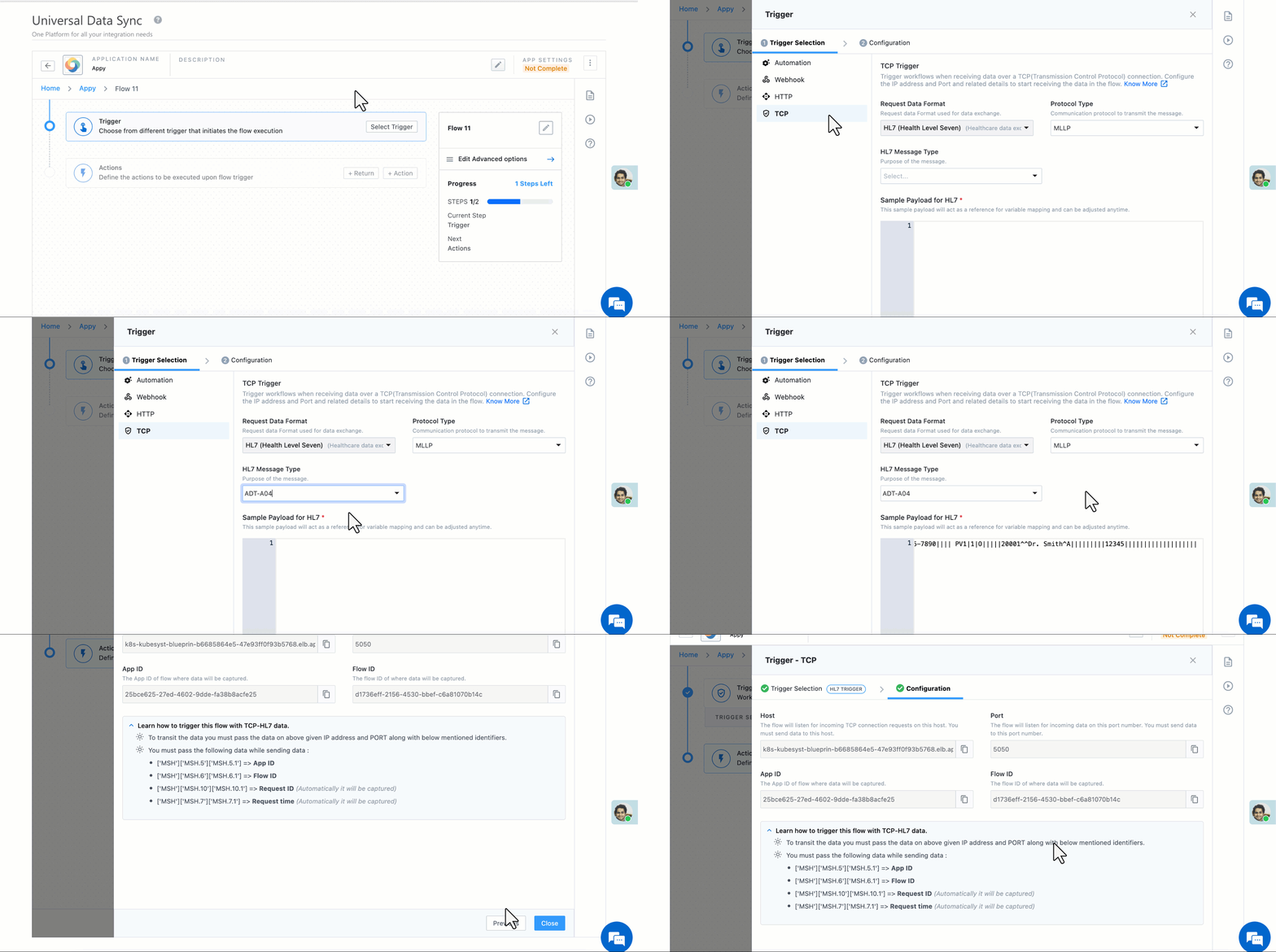
A TCP Trigger starts a workflow when HL7 data is received over a TCP connection.
Step 1: Trigger Selection
- Request Data Format: HL7 (pre-selected)
- Connection Type:
- TCP
- MLLP (recommended for HL7)
- Message Type: Select the relevant ADT or SIU event
Sample HL7 Payload
Provide a sample HL7 message from the source system or send a test message. This sample is used to identify segments and enable variable mapping.
MSH|^~\\&|HIS|Hospital|LSQ|LeadSquared|202401011230||ADT^A04|MSG00001|P|2.3
EVN|A04|202401011230
PID|1||12345^^^Hospital||Doe^John||19800101|M|||123 Main St^^City^State^12345||9876543210
NK1|1|Doe^Jane|SPOUSE|9876543211
Step 2: Configuration
After saving the trigger, UDS generates:
- Host (IP Address)
- Port Number
- App ID
- Flow ID
Configure the external system to send HL7 messages to the provided host and port.
Note: All TCP triggers within a tenant share the same host and IP. App ID and Flow ID help identify the target workflow.
5. Configure TCP Action
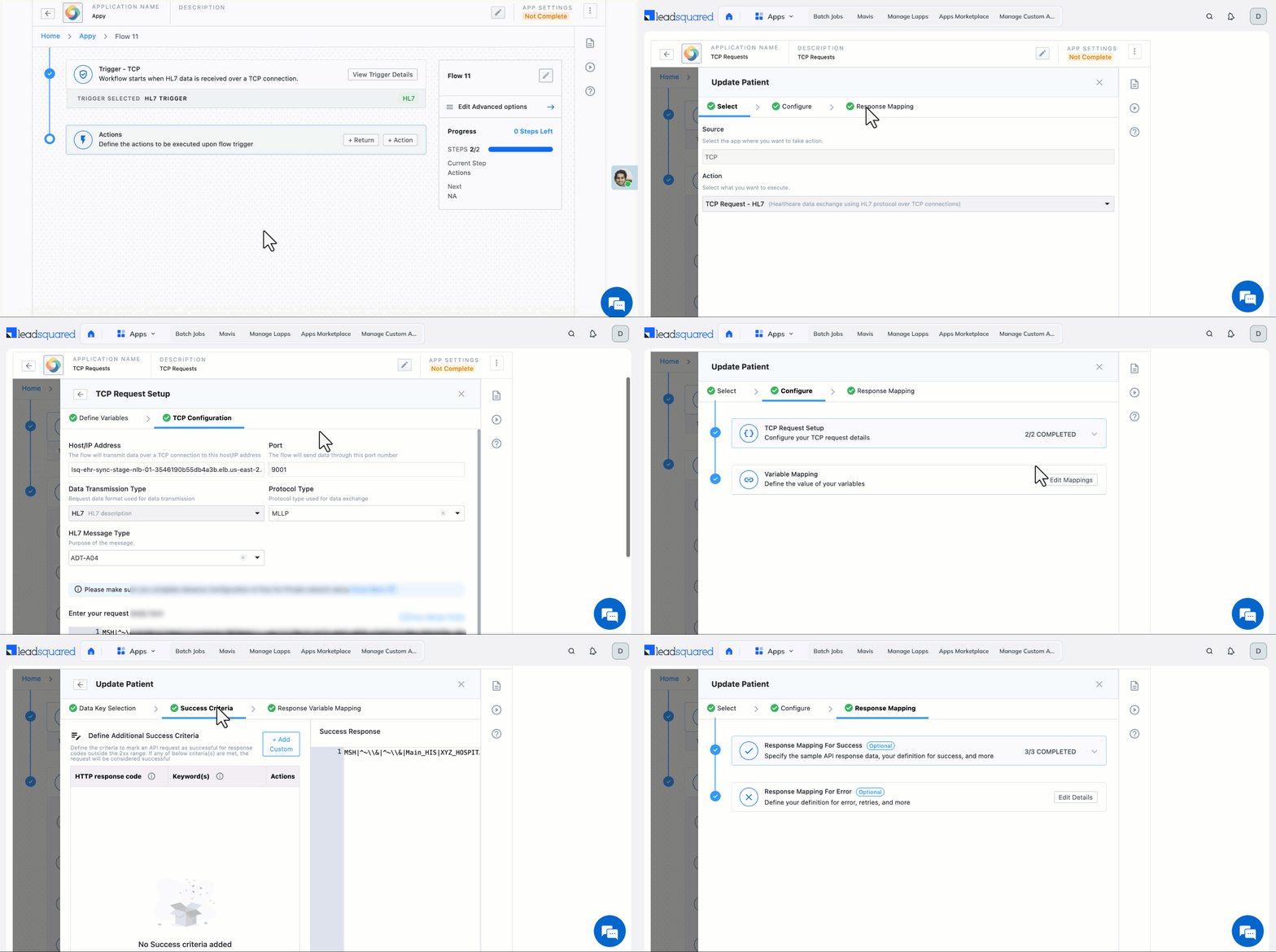
Variable Mapping
- Variables extracted from the TCP trigger or previous actions can be inserted into the HL7 request body
- Users should map values based on HL7 segment definitions (PID, EVN, MSH, etc.)
Configuration Details
Provide the following information:
- Destination Host / IP Address
- Port Number
- Protocol Type: TCP or MLLP
- Data Transmission Type: HL7
- Message Type: ADT or SIU event
- Request Body: HL7 message (supports variables)
6. Logs
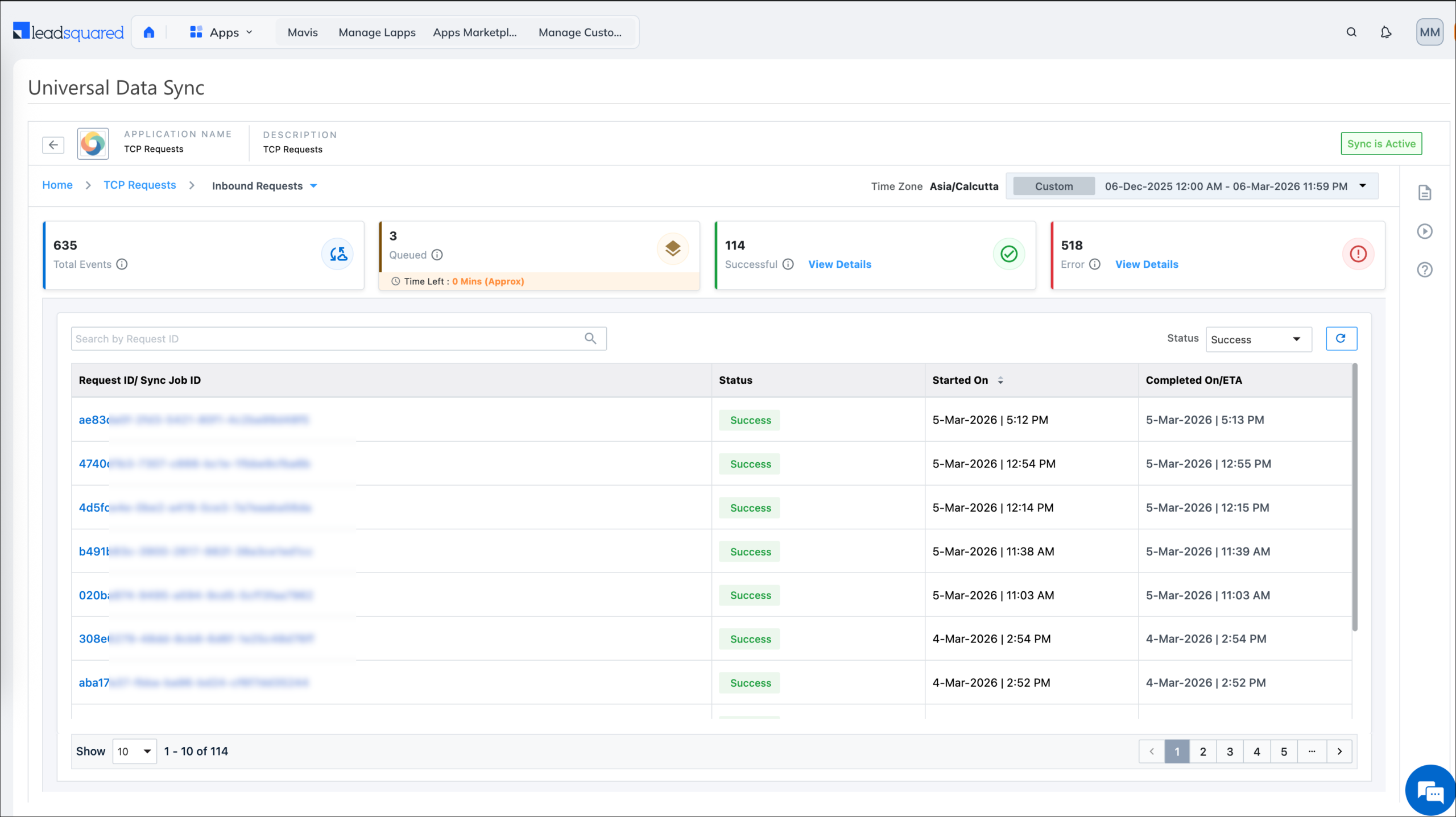
Execution logs are available for monitoring and troubleshooting.
FAQs
Is TCP supported for non-healthcare use cases?
TCP support is designed primarily for healthcare and legacy systems. Non-healthcare use cases are supported only if the external system uses HL7 over TCP.
Can I send or receive JSON data over TCP?
No. Currently, only HL7 data format is supported for TCP triggers and actions.
What is the difference between TCP Trigger and Webhooks?
Webhooks use HTTPS endpoints, while TCP Triggers rely on socket-based communication using IP and port. TCP is commonly required by legacy and healthcare systems.
Should I use TCP or MLLP?
MLLP is recommended for HL7 communication as it safely wraps messages over TCP.
Are UI changes expected for TCP workflows?
Yes. UI improvements for TCP configuration are ongoing and may change in future releases.
Any Questions?
Did you find this article helpful? Please let us know any feedback you may have in the comments section below. We’d love to hear from you and help you out!





