


Get Started

Sales Suite
Field Ops
Marketing
Service CRM
Integrations & Apps
FloStack
LeadSquared Analytics on Service CRM

1. Feature Overview
Service CRM Analytics enables you to analyze and report on support tickets and ticket-related activities using LeadSquared’s Analytics framework.
It helps service teams track ticket volume, monitor SLA performance, evaluate agent efficiency, and understand how tickets move through different stages of the support lifecycle.
Common Reporting Use Cases
With Service CRM Analytics, you can create reports to:
- Track open, closed, and pending tickets
- Analyze ticket resolution and response times
- Monitor SLA compliance
- Measure agent workload and performance
- Review ticket activity trends over time
Note: For detailed information on report creation, joins, filters, aggregations, expressions, etc., refer to the Analytics Feature Guide.
2. Prerequisites
Service CRM is a paid product. To enable it on your account, contact your account manager, or write to scsupport@leadsquared.com.
3. Creating Service Analytics Reports
The process of building reports in Service CRM Analytics is the same as described in the Analytics Feature Guide. But, the Service CRM Analytics provides the following Service-specific data sources:
- Tickets – Includes ticket-level information such as status, priority, category, assignee, SLA details, and key timestamps.
- Ticket Activities – Captures actions performed on tickets, such as status updates, assignments, comments, and other ticket events.
These data sources form the foundation for building service-focused reports.
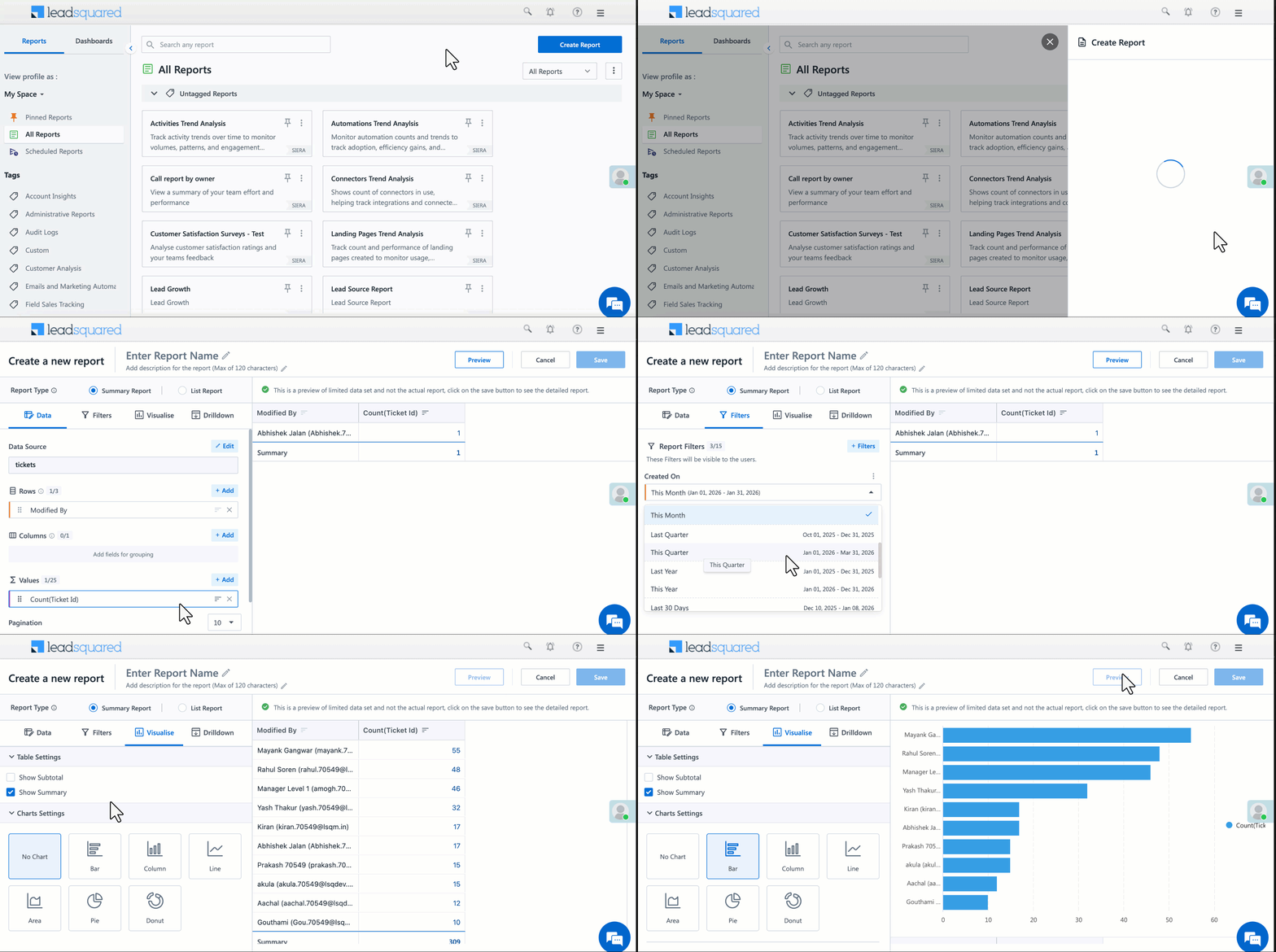
To create a service analytics report:
- Navigate to Analytics.
- Create a new report.
- Select Tickets or Ticket Activities as the data source.
- Configure dimensions, measures, and filters as required.
Any Questions?
Did you find this article helpful? Please let us know in the comments section below if you have feedback or questions. We’d love to hear from you and help you out!