
1. Feature Overview
LeadSquared’s Advanced Search lets you filter leads based on whether a specific activity, or any activity, has taken place within a given number of days. This is useful when you need to act on leads based on recent engagement — for example, following up with leads who had a phone call in the last 5 days, or identifying any leads with recorded activity in the last 2 days.
This article covers activity-based searches using the Last N and Next N Days conditions. For a full guide to Advanced Search, including filtering by lead details, tasks, email activity, and landing page activity, see Advanced Search in LeadSquared.
2. How It Works
Advanced Search filters leads across two broad categories: Activity (actions a lead has performed) and Lead Details (field values on the lead record). For activity-based searches, you select the activity type and a time condition. LeadSquared then returns all leads that match the criteria from the Manage Leads page.
Two time conditions are available:
- Last N lets you define a rolling lookback window — enter a number and choose Days or Hours (for example, “5 Days” returns leads with matching activity in the past 5 days).
- Next N Days lets you look ahead, returning leads with activity scheduled in the upcoming N days.
3. Search Leads by Activity Using the N Condition
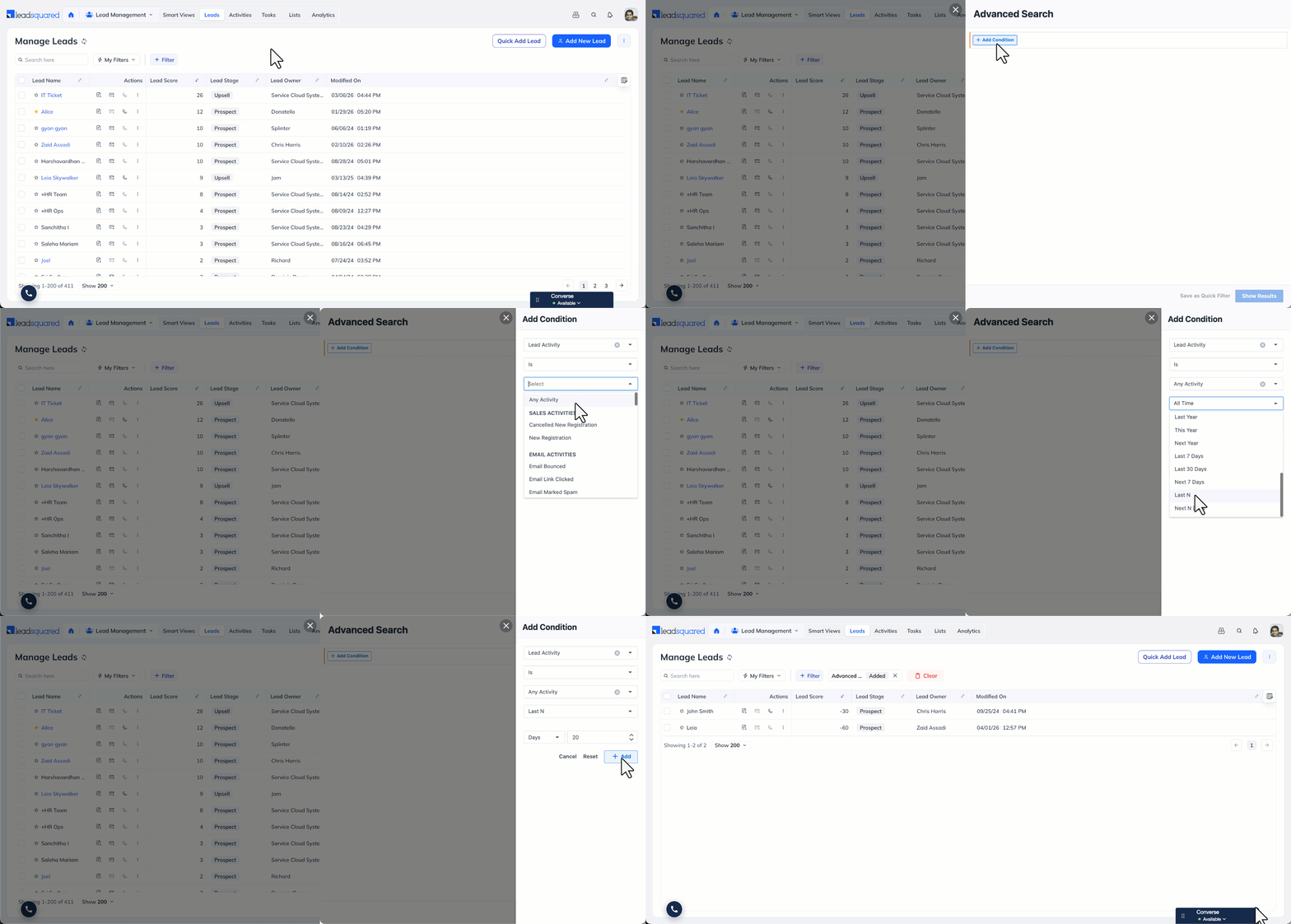
- Go to Lead Management>Leads.
- Click + Filter, and select + Advanced Filters.
- Click + Add Condition, in the search criteria dropdown, select Lead Activity.
- To search for a specific activity type, select it from the list (for example, Phone Call or Form Submitted).
- To search for any activity, select Is Any Activity.
- Set the time condition:
- Select Last N and enter a number, then choose Days or Hours to search for activity in the past N days or hours, or
- Select Next N Days and enter a number to search for activity scheduled in the upcoming N days.
- Click + Add to apply the criteria, then click Show Results.
Any Questions?
Did you find this article helpful? Please let us know any feedback you may have in the comments section below. We’d love to hear from you and help you out!





