


Get Started

Sales Suite
Field Ops
Marketing
Service CRM
Integrations & Apps
FloStack
Distribution Engine: Distribute Based on Ace Performance

1. Feature Overview
By default, the Distribution Engine assigns Leads, Opportunities, and Tasks to a fixed list of users, teams, or sales groups. With performance-based distribution, you assign records based on how your users are performing instead.
You select an Ace goal or leaderboard, and the engine auto-selects the users mapped to it for the cycle you choose. You can then filter those users and weight the distribution by their performance, so that records flow to the right users automatically as performance changes.
Use performance-based distribution when you want to:
- Route more records to your top performers, or fewer to those who are behind target.
- Keep the recipient list in sync with an Ace goal or leaderboard, without editing the rule each cycle.
- Distribute Leads, Opportunities, or Tasks based on achievement against a target rather than a static user list.
2. Prerequisites
- Distribution Engine is a paid feature. To enable it, contact your account manager or email support@leadsquared.com.
- Ace must be enabled on your account, with at least one active goal or leaderboard that has users and a cycle defined. To learn how to set these up, see Ace – Feature Guide.
3. Where Performance-Based Options Appear
The Ace options appear inside the distribution rule, at the same steps you would use for a manual setup:
- Select Users step – Choose Performance Criteria (Ace) to auto-select users from a goal or leaderboard (see Section 4).
- Distribution Method step – The users selected by your performance criteria flow into whichever method you choose: Round Robin, Weighted, or Load Balanced (see Section 5).
To create or edit the rule itself, follow the steps in Distribution Engine, and configure the Ace options as described below.
4. Select Users by Performance Criteria
In the Select Users step, choose Performance Criteria (Ace) as the user selection type. Instead of picking users one by one, you select an Ace goal or leaderboard, and the engine auto-selects the users mapped to it.
4.1 Select a Goal or Leaderboard and Cycle
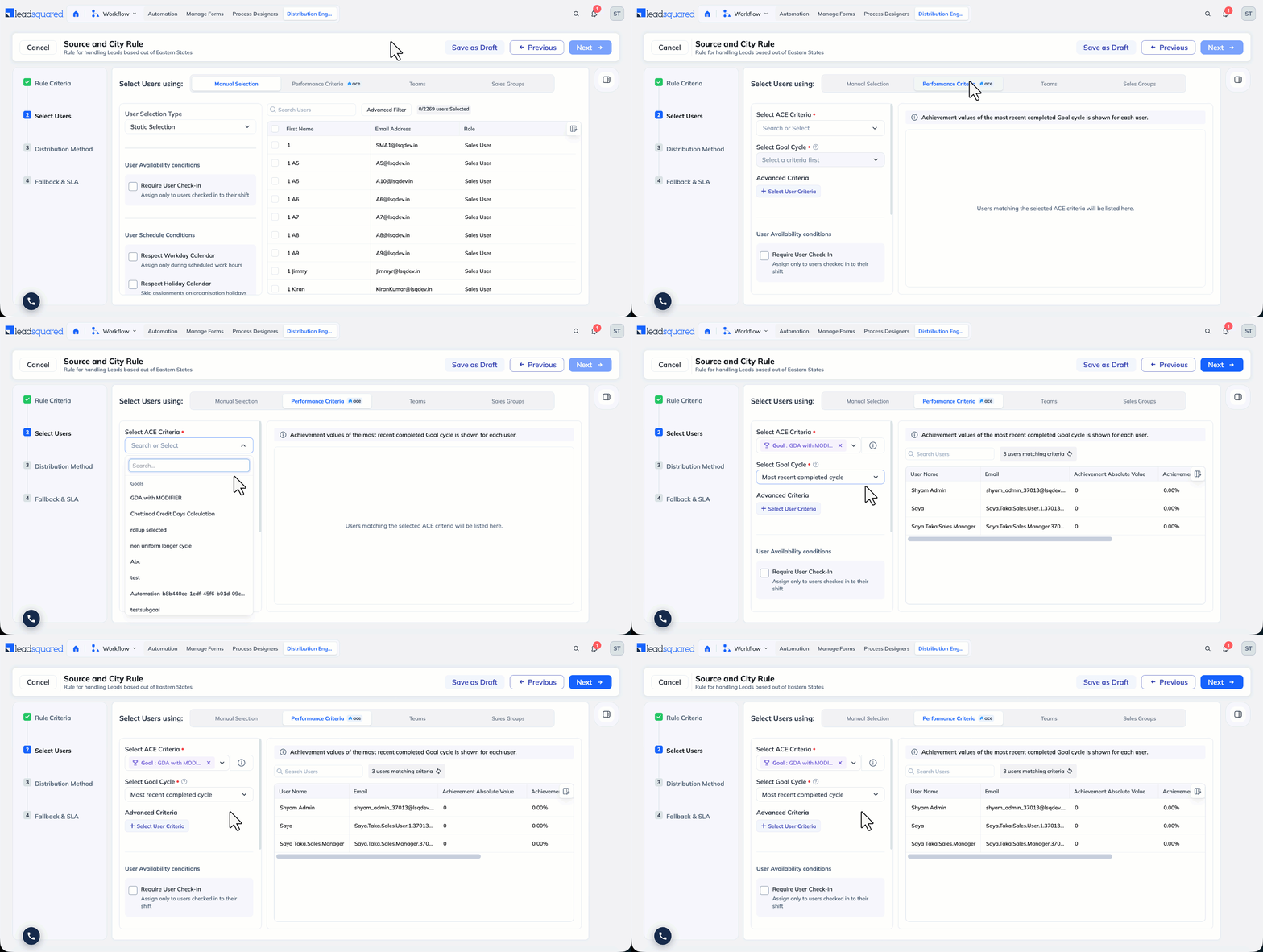
- Select Performance Criteria. The engine lists all available goals and leaderboards.
- Select a goal or leaderboard. If a goal runs on multiple cycles (for example, weekly or monthly), the engine lists each cycle.
- Select a cycle. The engine auto-selects the users who are part of the goal or leaderboard for that cycle.
You can select a specific cycle or the Most Recent Cycle. When you select Most Recent Cycle, the engine automatically picks up the latest completed cycle as cycles roll over. For example, once the May cycle completes, the engine moves to the June cycle and refreshes the selected users, so you do not have to update the rule each cycle.
Review the Selected Users
For a manual user selection, the user list shows all user fields. For performance-based selection, the list shows only the Username, Email, and the three Ace fields:
- Achievement Percentage – The user’s achievement against their target for the cycle, as a percentage.
- Achievement Absolute Value – The user’s achievement against their target for the cycle, as an absolute value.
- Target – The user’s assigned target for the cycle.
4.3 Filter the Selected Users
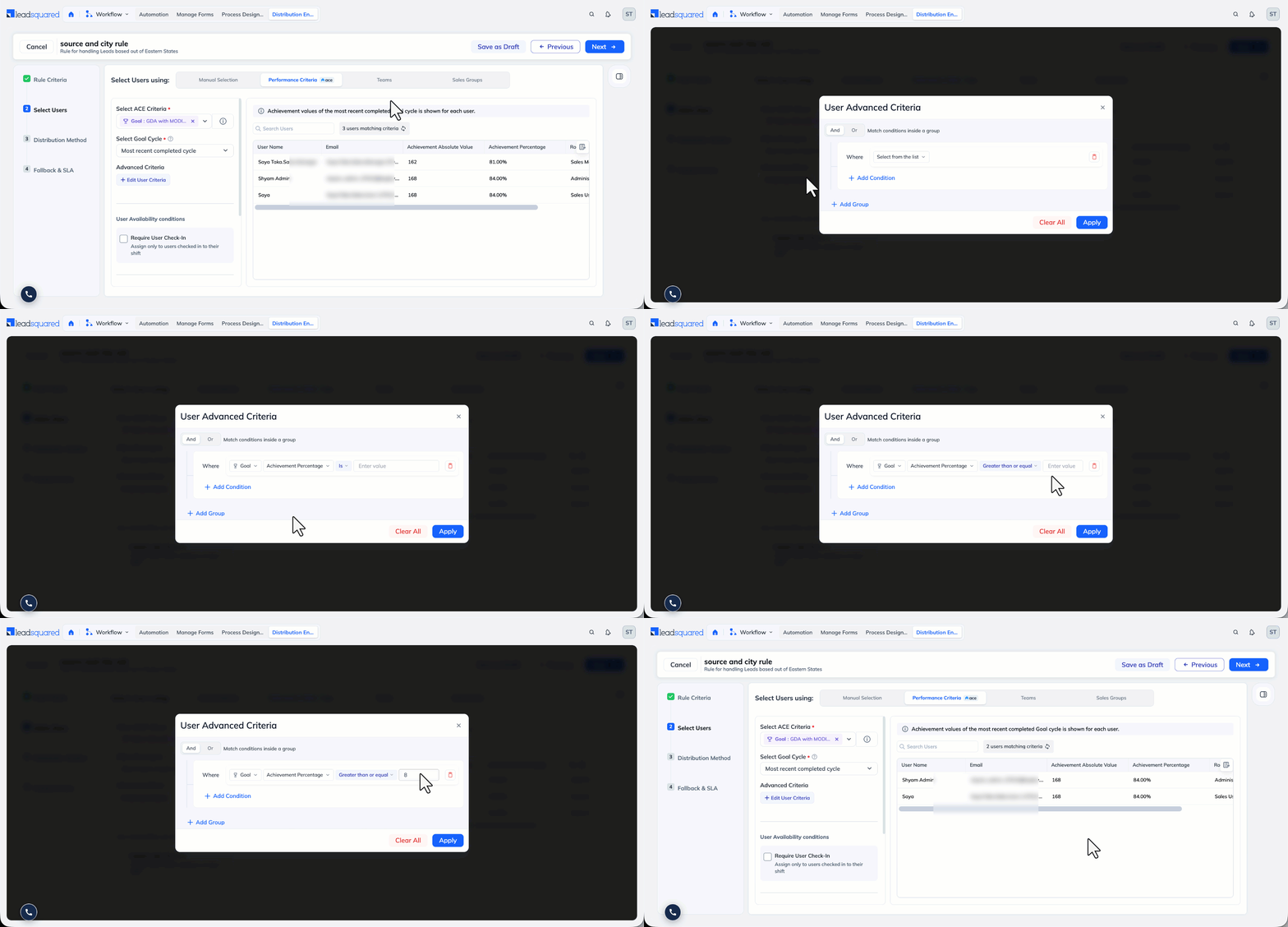
After the users are auto-selected, you can apply the Advanced Criteria filter to narrow the list down further. In addition to user properties, the filter supports the three Ace fields above. For example, you can include only users whose Achievement Absolute Value is 500 or more, so that records go only to your top performers for that cycle.
5. Choose a Distribution Method
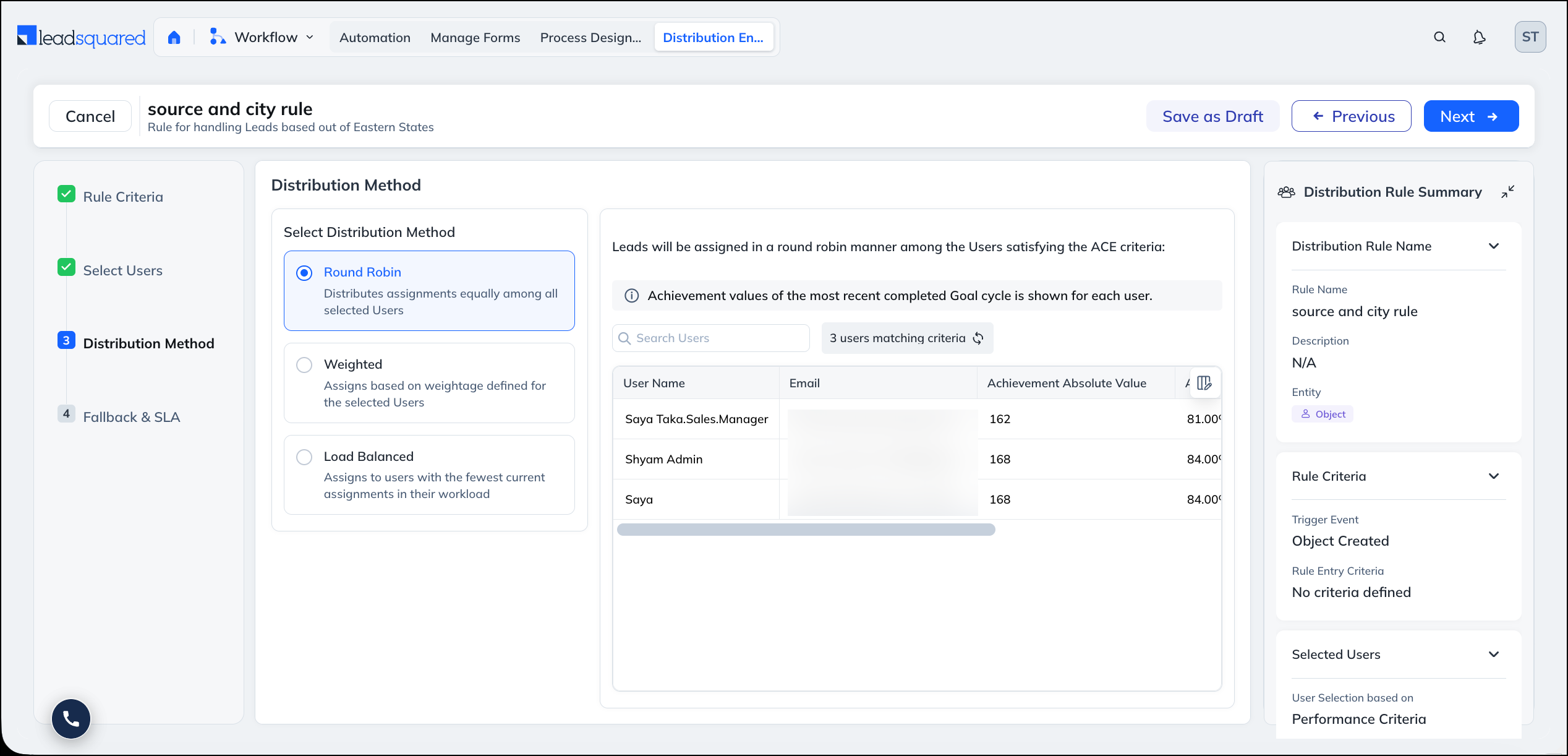
After the users are selected by performance criteria, you choose a distribution method in the Distribution Method step, exactly as you would in a standard rule. The performance criteria decide which users receive records; the distribution method decides how records are split among them. For how each method works in general, see the Distribution Method step in Distribution Engine.
Only the Weighted method has Ace-specific options. Round Robin and Load Balanced behave the same as in any other rule.
5.1 Round Robin
Round Robin assigns records to the selected users in rotation, one after another. There are no Ace-specific options. The engine simply cycles through the users chosen by your performance criteria.
5.2 Weighted
The Weighted method lets you give some users a larger share of records than others. When your users are selected by performance criteria, you can base that weightage on Ace performance instead of setting it manually. There are two ways to do this:
5.2.1 User-Level Weightage
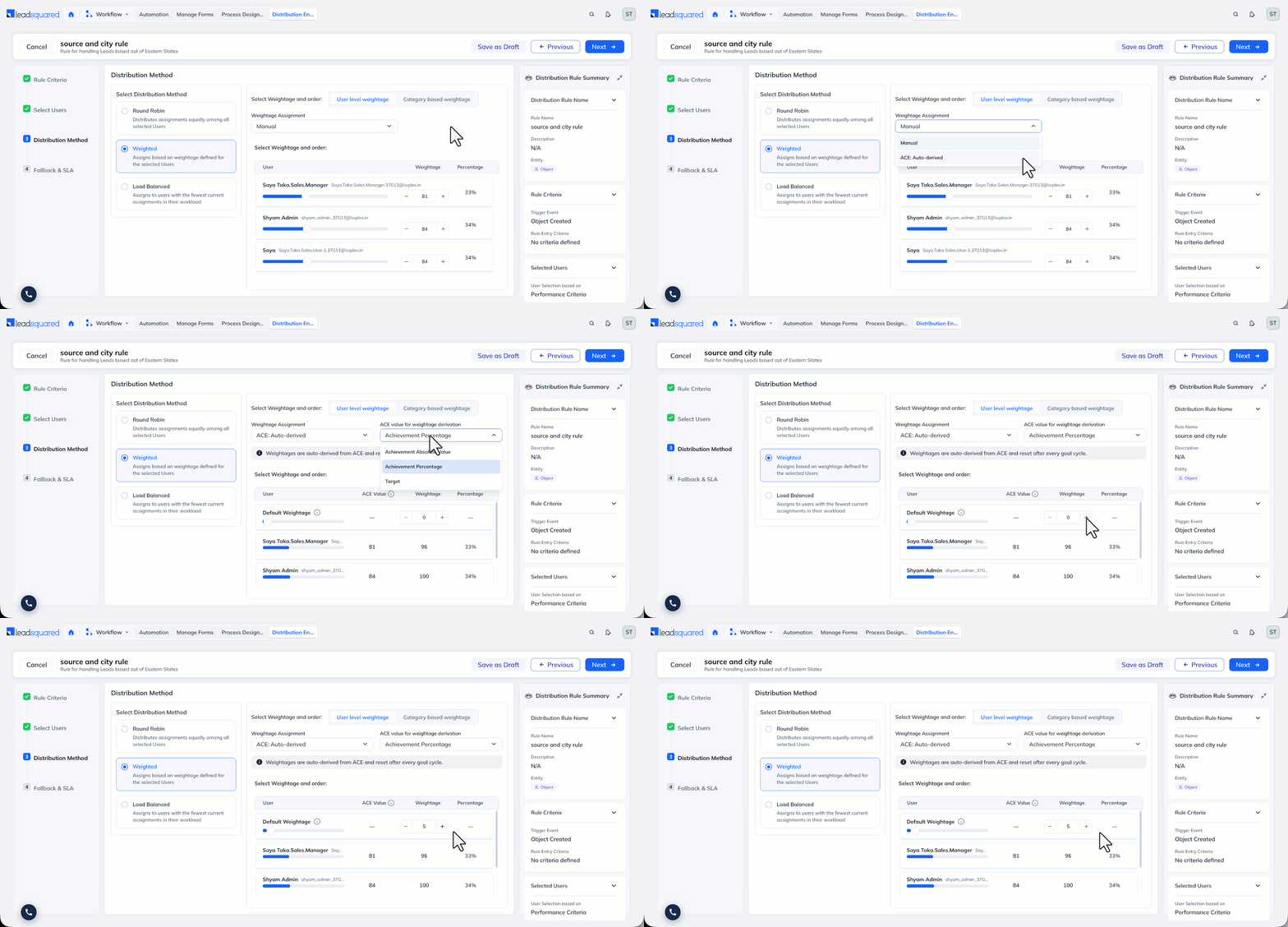
The first option is Manual. Works the same as in a standard rule: Assigns based on weightage defined for the selected users.
Next option is Ace Auto-derived. Under Weightage Assignment, choose Ace: Auto-Derived. Select one of the three Ace fields (Achievement Percentage, Achievement Absolute Value, or Target), and the engine derives each user’s weight automatically from their performance on that field. You do not enter weights manually, and the weights adjust on their own as performance changes.
Default Weightage
When Ace decides the weights, users with higher achievement get more records and users with lower achievement get fewer. A user whose achievement is 0 would get no records at all.
Set a Default Weightage to give these users a small share anyway, so they are not left out completely. Use the control at the top of the user list to set it. If you leave it at 0, users with no achievement receive no records.
For example, say three users are part of the rule. Two of them have made progress on the goal this cycle, but the third has not started yet, so their achievement is 0. Without a Default Weightage, the third user gets no leads. With a Default Weightage, that user still gets a few leads while the other two continue to get the larger share. Giving the third user a share adjusts the shares of the other users too, so that the totals across all users still add up to 100%.
5.2.2 Category-Based Weightage
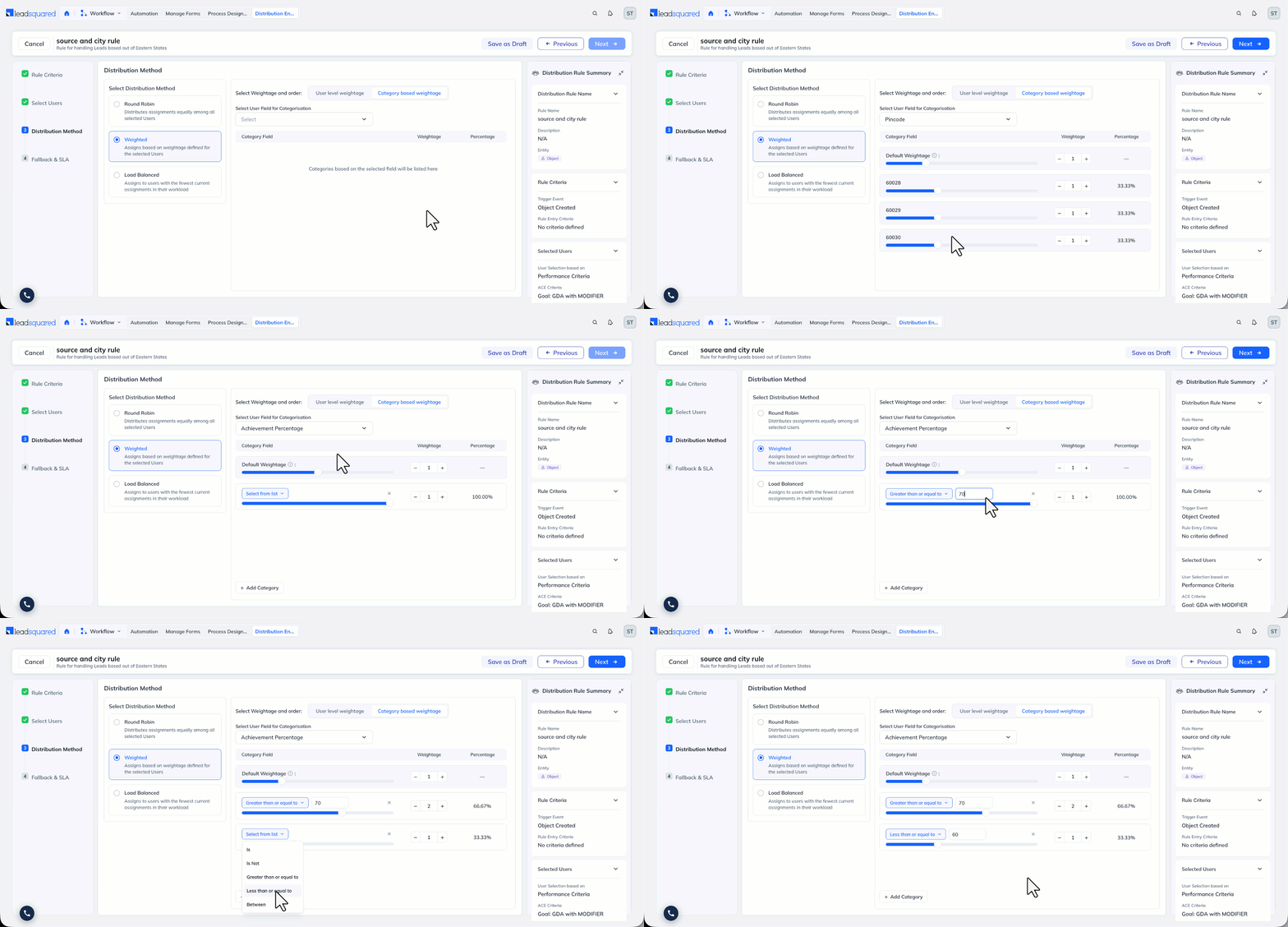
Under Category-Based Weightage, you can build categories from an Ace field in addition to dropdown-type custom user fields. When you base categories on an Ace field, you define the category boundaries using operators rather than fixed dropdown values. The available operators depend on the field type:
- For User fields, select from the available values and define the weightage.
- For the value-based Ace fields (Achievement Percentage, Achievement Absolute Value, and Target), use operators such as Is, Greater than or equal to, and Between to define each category by value. For example, set one weight for users whose achievement is Greater than or equal to 70% and a different weight for users below it.
5.3 Load Balanced
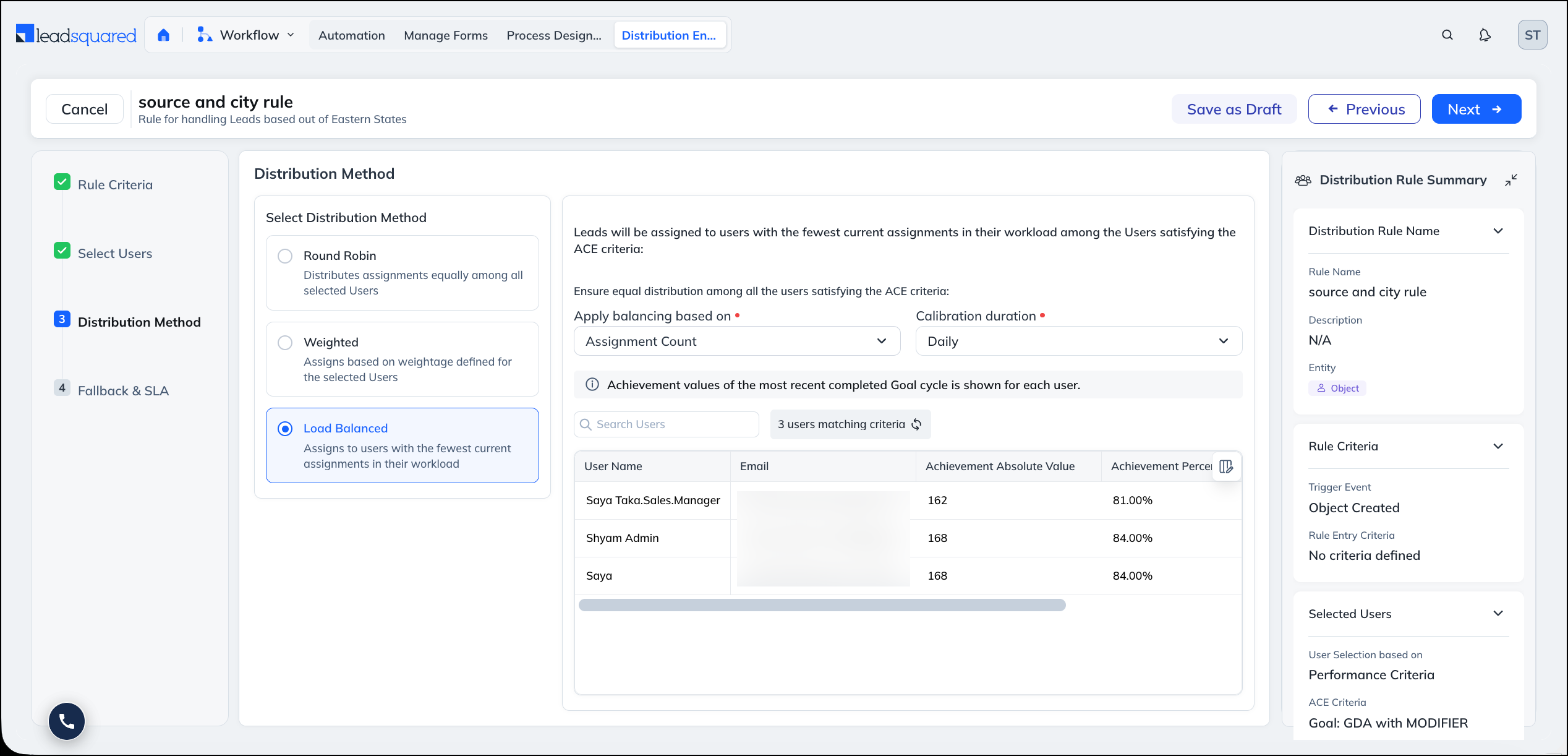
Load Balanced spreads records across the selected users based on how many records they already hold. It has two sub-methods:
- Assignment Count — Balances by the number of records assigned to each user over a defined period.
- Current Workload — Balances by how many records each user currently holds in the stages you select. You specify one or more stage fields or task status, the engine counts each user’s records in those stages and statuses, and the next record goes to the user holding the fewest.
The balancing is based on record counts and stages, not on Ace fields, so Load Balanced works the same whether you select users manually or by performance criteria. For setup details, see the Distribution Method step in Distribution Engine.
FAQs
1. Can I distribute Leads, Opportunities, and Tasks by performance?
Yes. Performance-based selection works for the same objects the Distribution Engine supports. The filter is based on the goal or leaderboard criteria, not on the object type.
2. What happens when a goal cycle ends?
If you selected a specific cycle, the user list stays fixed to that cycle. If you selected Most Recent Cycle, the engine moves to the next completed cycle automatically and refreshes the users.
3. How do I change which users are included?
Update the Goal or Leaderboard in Ace, or adjust the optional filter on the selected users.
4. Where do I configure the rest of the rule?
Rule criteria, fallback, SLA, and settings are configured the same way as any other distribution rule. See Distribution Engine.
Any Questions?
Did you find this article helpful? Please let us know any feedback you may have in the comments section below. We’d love to hear from you and help you out!