LeadSquared Mobile Updates (v7.9) for iOS
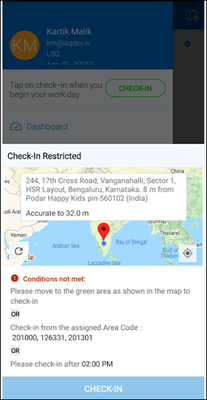
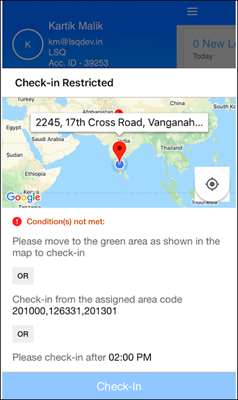
Here’s what’s new on LeadSquared for iOS – 1. Check-in/Check-out Restrictions Set location and time restrictions for checking-in/out from mobile. For example, you can – Configure a geo-fence…
Here’s what’s new on LeadSquared for Android – 1. Check-in/Check-out Restrictions Set location and time restrictions for checking-in/out from mobile. For example, you can – Configure a…
Here’s what’s new – Import Users through CSV You can now create and update users through CSV. For detailed instructions, see Managing Users through CSV Imports. …
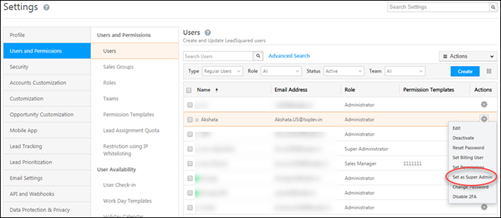
We’ve introduced a new super admin user role, a UI to view user hierarchies, allowed admins to mandate two-factor authentication at the account level and released a password…
Here’s what’s new on the iOS app – 1. It’s now possible to hide default forms on the Lead Details>Activity History screen. So if you’ve configured a process on the…
Here’s what’s new on the LeadSquared Android app – 1. It’s now possible to hide default forms on the Lead Details>Activity History screen. So if you’ve configured a…
Here are the latest updates on the LeadSquared iOS app – iOS v7.7 Location Tracking and Check-in The location tracking and check-in features are now independent. Location…
We’re out with more enhancements across key features on the web platform – Automation 1. Custom field sets are now supported in the update lead action. This…
Here are the latest updates on Android – Location Tracking and Check-in The location tracking and check-in features are now independent. All mobile users will see the…
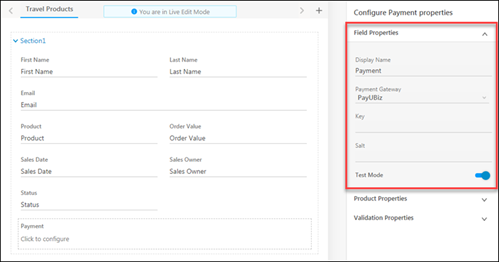
We’ve added some neat new features to help you get the most out of LeadSquared’s Forms and Processes. Add Tasks to Forms In addition to leads and…
Throughout October, we had a series on mini-releases where we launched a bunch of new features in addition to user experience improvements and critical bug fixes. Here’s a…
Here’s the latest on the LeadSquared Android app – Lead List The lead list can now be sorted as follows – Filters options can be set as…
Here’s whats’ new on iOS – Large option sets are now supported in dynamic forms. Multi-select dropdowns, including product fields, are also supported in forms on mobile. All phone fields…
Here’s whats’ new on Android – Large option sets are now supported in dynamic forms. Multi-select dropdowns, including product fields, are also supported in forms on mobile. In…
The following Accounts and Forms based enhancements are now available on the iOS app – Accounts Now create accounts straight from the app – Map leads to…
We’ve made enhancements on the mobile app to accommodate more accounts and dynamic forms based features. Accounts Now create accounts directly from the LeadSquared app – You…
We’re out with our latest release for the LeadSquared web platform. Here are some highlights – New automation conditions and actions Now run automation on static lists Processes…
Here’s what’s new on the iOS app – Large option sets are now supported in default lead and activity forms. We now support the following on the mobile…
This release has multiple enhancements that allow you to integrate dynamic forms and processes in different screens on the Android app. Lead Identification Pop-up Forms can be…
Here’s what’s new – Forms are now available on mobile All forms, along with rules, that have been configured for mobile through the Process Designer will now reflect…
Here’s what’s new – OTP Verification OTP verification is now supported for phone and email fields in forms. The validation must be enabled from the web app during…
ADFS integration now available on iOS. For details, see ADFS Integration for Signing-In.
Here’s what’s new in our latest Android release – 1. The default lead forms now support large options set for dropdown type fields. For details, see Large Options…
Google Analytics reports are now available right within the LeadSquared web platform. They’re accessible in the Website and Landing Pages category of the Reports section (Navigate to Reports>Reports…