


Get Started

Sales Suite
Field Ops
Marketing
Service CRM
Integrations & Apps
FloStack
‘Star’ your Leads

1. Feature Overview
The Star feature allows you to mark important leads from the Manage Leads page for quick access later.
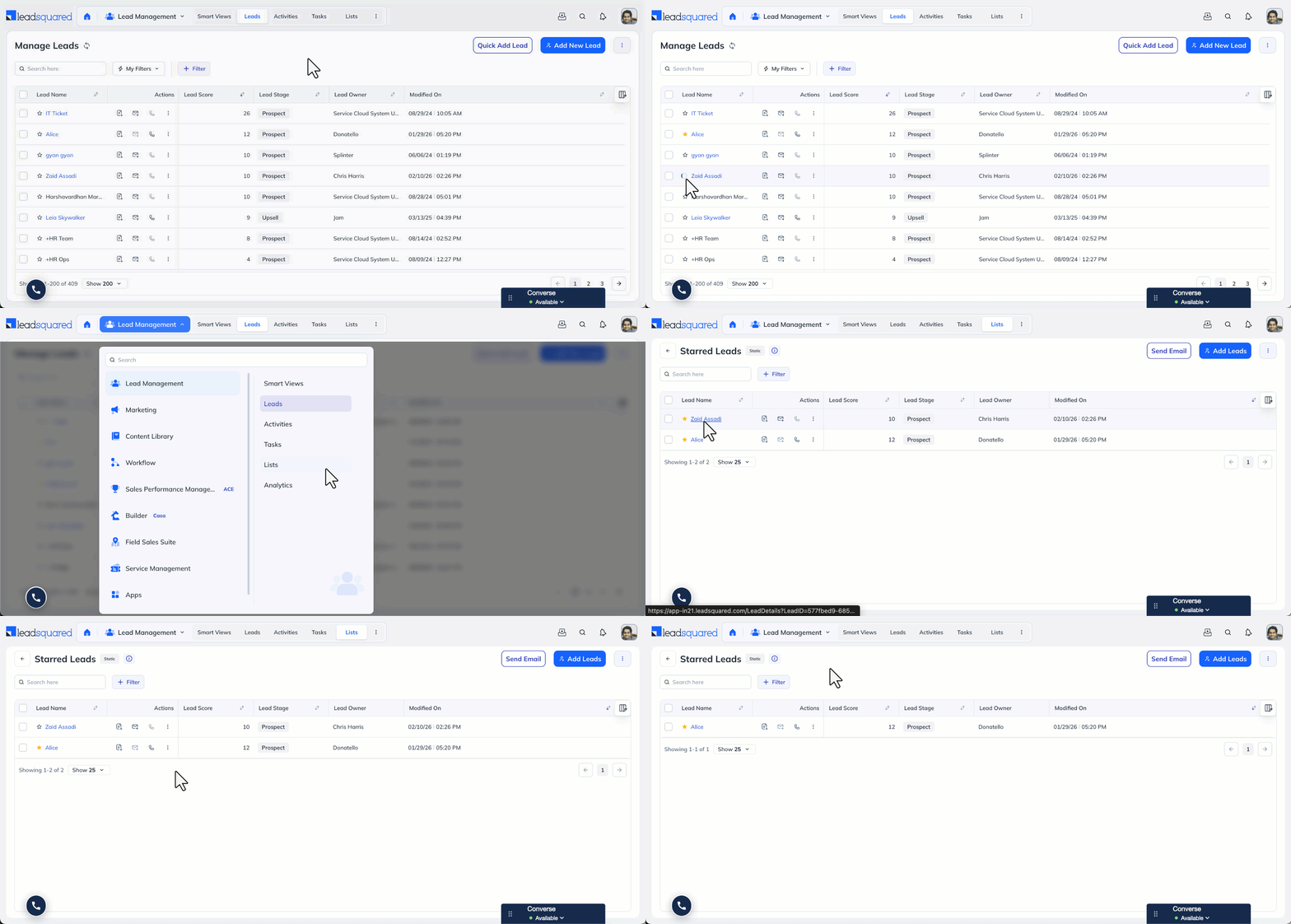
When you star a lead, it is automatically added to the Starred Leads List, available under the Manage Lists page.
This feature helps you temporarily group and track leads without modifying lead data or creating manual lists. The Starred Leads List is automatically maintained based on your actions.
2. Use Case
You can use the Star feature to manage leads that require focused attention.
For example:
- Star leads that require follow-up.
- Access them collectively from the Starred Leads List.
- After completing the required action, un-star the lead to remove it from the list.
This allows you to maintain a dynamic working list without creating additional manual filters or static lists
3. How to Star Your Leads
- Select one or more leads on the Manage Leads page.
- Click the Star option to mark them.
- Starred leads are automatically added to the Starred Leads List.
- Navigate to Lead Management>Lists>Starred Leads.
- If you un-star a lead, it is automatically removed from the list.
- The list updates in real time based on your actions.
You can star individual leads or multiple leads in bulk.
Note:
- User-Specific Setting:
Starring a lead is personal to the logged-in user. If you star a lead, it will appear as starred only in your account. Other users will not see the lead marked as starred in their login, even if they have access to the same lead. - Automatic List Management:
The Starred Leads List is system-generated. You cannot manually add or remove leads from this list except by starring or un-starring them from the Manage Leads page. - No Impact on Lead Data:
Starring a lead does not modify any lead fields or properties. It functions only as a visual and organizational marker.
Any Questions?
Did you find this article helpful? Please let us know any feedback you may have in the comments section below. We’d love to hear from you and help you out!